Introduction
A STEM robot kit is classroom-ready only when its supported devices, software, components and lesson workflow fit the school’s environment. Attractive blocks and a successful supplier demonstration do not establish that students can start, recover and finish a lesson on managed classroom computers.
Education buyers should therefore treat hardware assembly and coding-platform compatibility as separate review areas. A kit can assemble correctly while requiring software that the school cannot install. It can also support a coding interface without allowing programs to transfer to another platform that looks similar.
This STEM robot classroom preparation guide supports procurement of a kids STEM robot kit. It proposes a pilot workflow, not completed KudBo school projects or learning-outcome research. Final software support, age suitability and destination safety requirements need model-specific confirmation. Do not assume compatibility with a named education ecosystem from visual resemblance.
Define the School Robot Kit Device Requirements
Ask the school which device models, operating systems and administrative policies apply. Record the actual classroom environment rather than a generic laptop requirement. Connection type, permissions and installed software can determine whether a kit is usable even when its hardware functions correctly.
Request the supplier’s supported list with version and evaluation status. Separate confirmed configurations from inferred or unreviewed ones. A software update can change behavior, so record the date and product revision. Do not promise support for every future operating-system release without an appropriate commitment.
LEGO Education’s SPIKE system requirements are an example of explicit manufacturer disclosure for its own products. They do not establish compatibility for another robot kit. The useful purchasing lesson is to request similarly clear model-specific information, not to copy the list.
Review Coding Robot Platform Compatibility
Similar blocks do not prove interoperability
Ask which coding environment the kit actually uses and how programs are saved, transferred and executed. A block-based interface can look familiar without accepting another platform’s files. Keep visual similarity separate from functional compatibility and any intellectual-property or branding considerations.
LEGO Education’s technical information explains boundaries for its own software, including program compatibility. This illustrates why platform support needs documentation. It is not evidence that a third-party kit runs LEGO or Scratch programs.
Name the supported language scope
If text-based coding is offered, identify the actual implementation and supported libraries. A language name alone does not prove access to every desktop feature or package. Ask for a working example and documentation for the quoted controller and software revision.
Avoid broad claims such as teaches every coding language or compatible with all educational software. A clearly supported entry-level environment can be useful without those promises. The buyer should select a platform that fits the lesson and support resources available to the school.
Build a Robot Lesson Setup Checklist
List the steps from opening the kit to completing the first approved activity. Include component identification, power preparation, connection, software access and program execution. Decide who performs each step: teacher, administrator or student. A requirement that is easy for an IT specialist may be unrealistic during a lesson.
Check whether the kit needs accounts, internet access or downloads. School policies may limit all three. Do not ask teachers to disable security settings or install software from an unverified source. Resolve those constraints before purchasing rather than expecting classroom staff to improvise a workaround.
Record separately required equipment. A supplier demonstration may use a tablet, cable or charger not included in the retail unit. The quotation and lesson instructions should make those dependencies clear. A product is not classroom-ready simply because the hardware arrives in a tidy box.
Evaluate Classroom Coding Offline Access
Ask what offline means for the exact system. It may refer to previously downloaded lessons, local editing, program transfer or device execution. These are different capabilities. A web page remaining open after connection loss does not prove that the entire workflow can operate without internet.
Use a test account and an approved school-device configuration for a pilot. Observe access, saving and execution under the supported offline conditions. Keep content unavailable states visible. Do not claim permanent offline operation if authentication or a service is required at another stage.
For a noncoding alternative such as a magnetic STEM marble run, the classroom preparation burden differs. Component and safety review remain important, but software infrastructure may not be relevant. Compare the learning task and teacher effort rather than assigning every STEM product the same requirements.
Create a Classroom Acceptance Matrix
| Area | Required record | Approval boundary |
|---|---|---|
| Devices | Actual classroom model and system | No inference for every tablet or computer |
| Software | Official source, version and permissions | No unverified installation workaround |
| Coding | Supported environment and examples | Similar appearance does not prove file transfer |
| Connectivity | Required online and offline stages | One cached page is not complete offline use |
| Components | Exact kit and spares | Photo count must match the pack-out |
| Lesson | Setup, execution and restoration | Supplier expertise is not every student’s experience |
Use result labels that explain limitations. Observed working, blocked by school policy and not evaluated are more informative than a simple universal-compatible tick. Include the pilot date so changes in software or infrastructure can be reviewed later.
Mid-Article CTA
Send Your Requirements with your classroom devices, intended lessons, age-related brief and quantity. Email info@kudbo.com to discuss a complete sample and documentation request before a school or distributor order.
Plan Lesson Recovery, Not Only Success
Ask how the teacher recovers from a disconnected controller, a missing component or an incorrectly loaded program within the supported instructions. A lesson can lose time even when the product is not defective. Clear recovery guidance helps determine whether the kit suits the classroom’s available support.
Do not deliberately create electrical faults or expose students to an unapproved sample. Use suitable adult reviewers and controlled setup observations. Safety assessment and age grading need separate evidence. The pilot’s purpose is to review the supported lesson workflow, not improvise hazardous challenges.
Record whether a teacher can distinguish a programming issue from assembly or connection confusion. A useful support guide describes symptoms and approved next steps without requiring deep engineering knowledge. Preserve unresolved issues rather than repeatedly restarting until the demonstration looks successful.
Review STEM Kit Program Transfer Limits
Ask where files are stored, what format they use and whether the controller can retain a program without the host. Clarify transfer between devices and accounts. Do not infer portability merely because the software has a save button or uses a familiar block interface.
If students share hardware, establish how earlier programs and settings are cleared or restored. Use fictional work during evaluation and avoid unnecessary student information. Account ownership and privacy responsibilities need review where personal data or cloud storage are involved.
The ICO’s data-minimisation guidance is a relevant framework where applicable, not approval of the coding system. The school should identify its obligations and supported administrative process rather than assuming an educational app is exempt from data concerns.
Assess Components and End-of-Lesson Storage
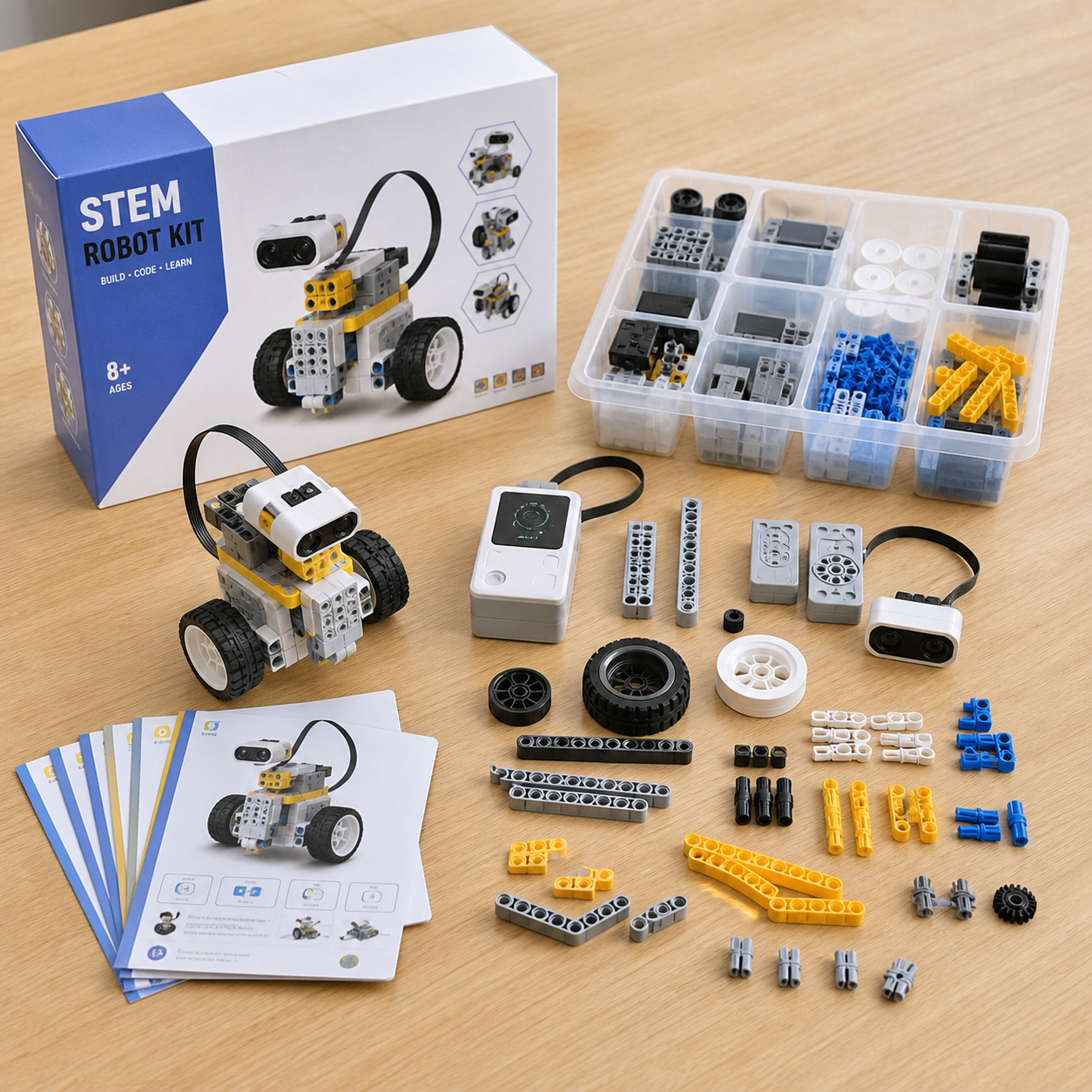
Confirm the exact part list, identifiers and any spare components. A kit photo can contain a finished model and extra blocks that are not all supplied. Count the retail unit and make assembly instructions match it. Missing essential pieces can interrupt a lesson even when the controller works.
Observe sorting and restoration after the activity. A tray that helps identify parts can reduce setup effort, but that benefit should be assessed in the real kit. Do not promise a quantified lesson-time saving from an attractive layout alone. Record the user task and limitations.
Ask which parts are replaceable and how revisions affect compatibility. A similar-looking connector or sensor may not behave identically. Maintain approved spare identifiers and commercial terms. Do not promise that every generic block or component can substitute for the assessed kit.
Keep Education Claims Evidence-Based
Describe the supported activity: assembling a model, executing a defined program or observing a sensor response. Avoid claiming guaranteed improvements in intelligence, grades or career outcomes without appropriate research. A practical learning tool can be valuable without broad outcome promises.
The CPSC toy-safety business guidance provides US context for applicable products. Product classification, age and destination affect the review. A successful coding pilot does not establish child-product compliance, and a compliance file does not prove a specific educational outcome.
Application images should show plausible hardware and a supported setting. Do not display code suggesting functions the kit does not offer. An AI-generated classroom image should remain an illustration, not evidence of a real school deployment, student result or customer endorsement.
Compare Quotations on the Complete Deployment
Record hardware revision, supported software, relevant license or account requirements, lessons, accessories and spares. A lower unit price may omit content or support needed for the intended classroom. Compare the complete deployment rather than the robot housing alone.
Require notification of changes to the controller, radio, sensors, firmware, software or relevant components. Review affected device and lesson evidence. A matching exterior is not proof that an update preserves the approved coding workflow.
Factory testing and shipment inspection should identify their actual scope. They can verify components, assembly and agreed operation, but cannot test every school policy or future software version. The KudBo catalog supports assortment selection; the approved deployment matrix should control the order.
An Example Classroom Decision
Imagine a hypothetical school whose devices support the kit’s hardware connection but cannot install the required software under current policy. The kit is not ready for that deployment merely because it works on a supplier laptop. The buyer can obtain an approved administrative path, choose another system or narrow the pilot.
This is not a KudBo school project or measured teaching result. It illustrates how device requirements and classroom preparation can decide a purchase independently of block count or robot appearance. Resolve the infrastructure boundary before ordering a full classroom quantity.
Prepare the Teacher Handover Sheet
Summarize supported devices, software access, components, power and the first activity. Name who handles each prerequisite. Teachers should not discover administrator-only installation when students are waiting.
Include the approved recovery route for setup confusion. Explain how to identify a disconnected controller or incomplete assembly without bypassing school controls. Link steps to the actual revision.
Identify which stages work offline and which do not. Downloaded content may remain available while transfer requires another condition. Stage-specific wording is more useful than an unrestricted offline badge.
Explain end-of-lesson restoration for shared kits. Parts should remain identifiable and permitted settings restored. Do not assume users discover program or account reset without guidance.
Describe the activity without promising grades or proficiency. Photographs should show plausible hardware, not imply a school endorsement that did not occur. Retain the sheet with the accepted matrix. Platform or controller changes need review even if the assembled robot looks identical.
Keep the Approval Evidence Retrievable
Record the model, revision, method, conditions, observations and reviewer in the purchase file. A later reader should distinguish a supplier statement, a buyer observation and an unresolved requirement. Do not describe an illustrative photograph as a completed factory test or a real customer project. If a revised sample is proposed, identify what changed and review the affected requirement before carrying the earlier conclusion forward. This record should support the decision, not create certainty that the evaluation never established. Keep the final claim within the observed or appropriately documented scope, and make remaining limitations visible to the person approving artwork and the order.
Confirm the First Lesson's Dependencies
Before ordering, ask the teacher to identify every separately required item for the selected activity. Include the supported computer, relevant cable, approved software and any account or download. A robot shown moving in a supplier video does not reveal those dependencies. Record them with the lesson and retail-unit list so the school can budget and prepare the complete supported setup rather than discovering missing infrastructure after delivery.
Related Buyer Resources
Continue with Kids Microscopes: Optical Zoom vs Digital Size for a complementary purchasing question. Compare the full product catalog, or browse the KudBo sourcing blog or the product sourcing topic collection for additional buyer guides. These resources provide decision context; each product still needs its own model-specific approval.
Frequently Asked Questions
Do similar coding blocks mean programs are transferable?
No. Interfaces can look alike while using different formats, controllers and supported functions. Request the exact platform scope and working examples. Do not claim compatibility with a named ecosystem based on appearance, or assume that a save function makes files portable between unrelated education systems.
What should a classroom pilot include?
Use the actual managed devices, approved software and complete kit. Observe setup, connection, a defined activity, saving, recovery and storage. Record policy constraints and missing equipment. A supplier’s demonstration can show a possibility, but it does not establish readiness for every school environment.
What does offline support need to specify?
Identify which stages operate offline: content access, editing, transfer or execution. Authentication and downloads may still require a service. Test the supported sequence with a suitable account and device. A cached page remaining visible after disconnection is not evidence of a complete offline lesson workflow.
Can a coding pilot establish product safety?
No. Operational use, age suitability and destination safety assessment are separate questions. Use appropriate adult reviewers and safeguards for unapproved samples. Obtain model-specific evidence and competent review rather than treating successful program execution as proof of every child-product requirement.
Which changes need deployment review?
Changes to controllers, sensors, firmware, software, connectivity or relevant components can affect lessons and device support. Require notification and reassess the affected matrix. A matching housing does not prove that another revision preserves the approved classroom workflow or program-transfer behavior.
Conclusion
STEM robot classroom preparation should connect the hardware to the school’s actual devices, policies and lesson routine. Verify the coding platform, offline scope and recovery process before scaling a pilot. A clearly supported deployment is more useful than broad compatibility or educational-outcome promises.
Final CTA
Ask for Product Catalog or email info@kudbo.com with your destination, quantity, devices and intended activities. KudBo can discuss available education options and sample arrangements. Confirm deployment, software and age-related evidence before approving production.