Introduction
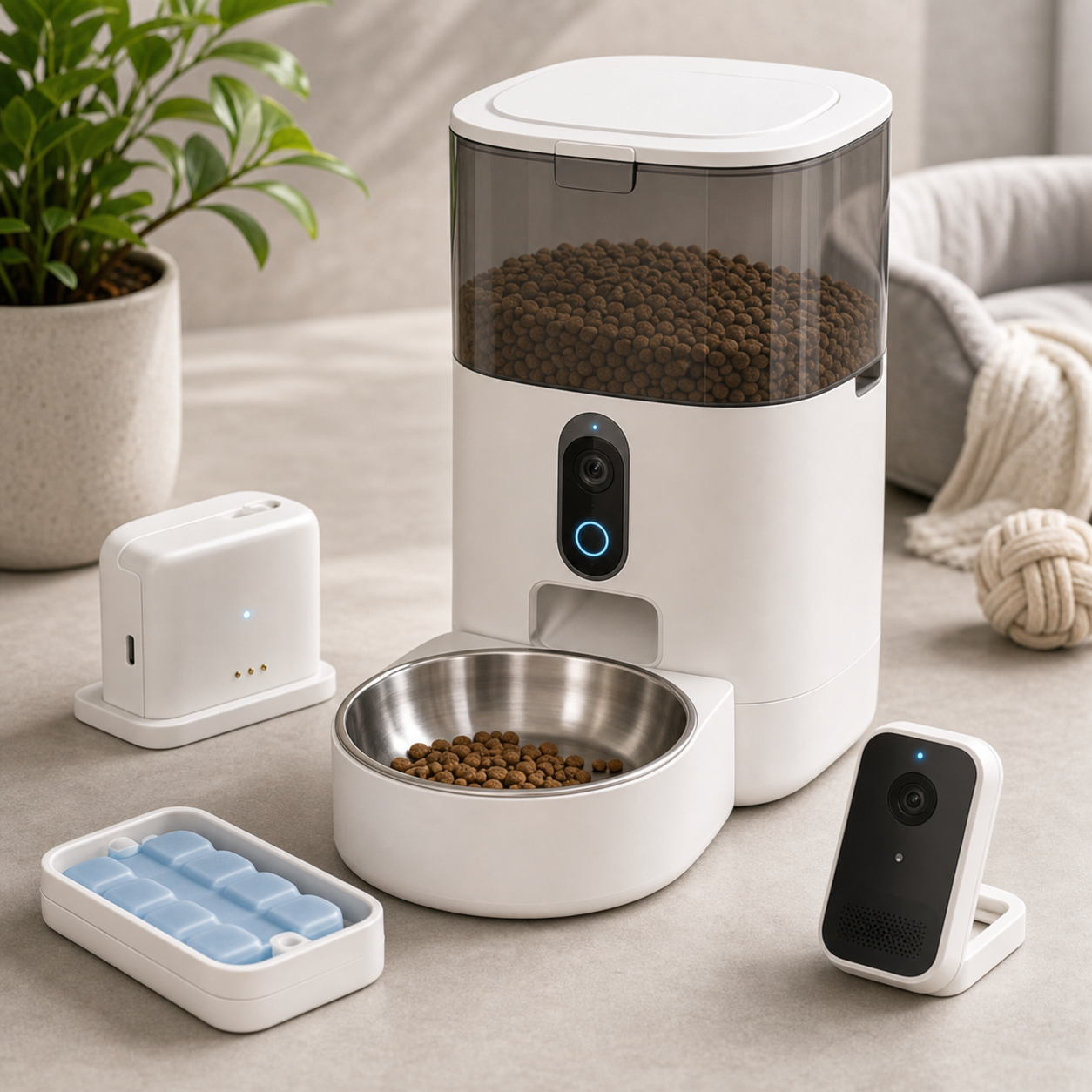
A camera on a feeder does not automatically show whether a pet has eaten. It may show the bowl, the room beyond it, or only a narrow area next to the dispenser. A buyer should approve the actual field of view and the data path before describing the unit as remote feeding assurance. The KudBo smart pet feeder camera belongs in a category where hardware placement, app access and animal behavior interact; a neat hero image proves none of those outcomes.
Earlier KudBo guides discuss pet feeder cleaning and food contact and kibble jams and offline schedules. This article answers a different question: can the camera help a customer understand the feeding area without capturing more of the household than intended? It is a purchase framework, not a claim that a specific production unit has been tested in a home. No camera view should substitute for responsible pet care or a feeding plan.
Define What the Buyer Wants to See
Ask the retailer to select one primary camera task. Is the user checking that food reached the bowl, looking for a pet approaching it, or viewing a room generally? A camera aimed at the dispensing chute may verify one event yet miss the animal; a wide room view may show the pet while leaving the food level unclear. Put the task in the specification and compare the actual sample against it. Do not promise visual confirmation of ingestion merely because an animal appears on screen.
Use a simple placement map: feeder body, bowl edge, expected approach direction, wall position and the portion of the room outside the desired view. Test the sample at the floor and against a wall, not only on a studio table. A tall feeder may create a blind spot immediately in front of its own bowl. A low camera may be obscured by food dust or a curious animal. The useful view also changes when the bowl is removed for cleaning or the feeder is moved to a different corner.
Ask whether the camera can tilt physically or through software. If a marketing photograph shows a broad view, record the camera position and distance used. If the product has night mode, check it in ordinary dim household light and identify any indicator LEDs or infrared emitters visible to the user. Do not turn one night image into a claim that the feeder provides a reliable security-camera service.
Make a Repeatable Viewing-Angle Trial
Build a sample scene with a bowl, a pet-sized marker and a few floor positions. At each position, capture what a user would see on the supported app. Record whether the marker and food area are visible, whether the device body blocks the view and whether a wide-angle lens distorts distance near the edge. The trial should use fictional room details, not real customer footage. These are suggested acceptance steps; they are not results from an undisclosed KudBo test.
Check image behavior across day and evening conditions. Does the exposure keep a dark-coated animal visible against a dark floor? Does a bright window behind the feeder wash out the bowl? If the app offers snapshots or clips, verify their resolution and retention separately from livestream quality. A one-second marketing clip cannot demonstrate that a user can distinguish empty from partly filled food across all kibble colors.
Put device and app versions on the observation sheet. A camera module, lens or compression setting can change while the outer housing stays the same. For a repeat order, ask the supplier to notify the importer before such substitutions. In shipment inspection, a defined image check can catch dead cameras and severe misalignment, but a full home-network or privacy assessment belongs to a separate review.
Keep Household Privacy Visible in the Brief
The FTC's home-camera guidance reminds buyers to consider whether connected cameras show private parts of a home and to review account security, encryption and updates. That guidance does not certify this feeder. For the quoted model, ask what video and audio are captured, whether audio can be disabled, whether recording is local or cloud based and who can view it. The package should not say “private and secure” without specific, verifiable controls.
Ask whether a user can restrict viewing to the feeding area through placement or software. If the feeder sits in a kitchen shared with children or visitors, a camera could show more than intended. Avoid marketing images with household members who have not consented to being filmed. For commercial pet-care settings, privacy obligations may differ from ordinary home use; the buyer should obtain appropriate local advice rather than assuming one account policy fits all destinations.
The FTC's connected-device security guidance provides a broader checklist for data collection, updates and supported-device lifecycle. Translate that into supplier questions: who operates the service, how long updates are promised, what happens after an account is closed and whether the feeder still dispenses food if video service ends. Keep the feeder function and camera function separate in both the acceptance plan and warranty language.
Mid-Article CTA
Send Your Requirements with the target market, bowl layout, intended camera task, supported phone systems and privacy requirements. Email info@kudbo.com to request a model-specific sample checklist and component list.
Test Account Sharing and Transfer
A pet owner may want another household member or sitter to view the bowl during a trip. The buyer should verify whether the app supports shared access, what each user can change and how access is revoked. A viewer-only invitation is different from giving someone the main account password. If the app has no granular permissions, say so rather than depicting a sophisticated family-sharing workflow that does not exist.
Resale and returns matter too. Test the factory reset on a sample account and confirm that a new owner cannot see the prior owner's clips or device settings. Ask whether recorded material remains with a cloud provider after the device is reset and how a customer can request deletion. Keep that process in the support materials. A returned feeder should not be repacked for resale merely because its plastic surfaces look clean.
Do not assume all connected models need an account for scheduled feeding. The earlier offline-schedule guide treats continuity as a separate question. Here, confirm how video is accessed and what a disconnected state looks like to the owner. A frozen last frame should be labeled as old content, not mistaken for a live picture of a pet.
Connect Camera Claims to Feeding Reality
The feeder's bowl and food path still need their own hygiene program. The CDC's pet-supply cleaning guidance distinguishes cleaning from additional disinfection and gives examples for feeding items. It does not validate a particular automatic feeder. A buyer should ask which parts are removable, which camera surfaces can be wiped and whether cleaning a food-contact area can wet electronics.
If the product listing says the camera detects a feeding event, define what is observed. Motion near the bowl, a motor command, food release and confirmed eating are four different signals. Use a claim table so the marketing team can match words to actual hardware and software events. A retailer may find that “check the feeding area remotely” is both accurate and attractive, while “know your pet ate every meal” may be unsupported.
The final pack should show the real included items: feeder body, bowl, power supply, any battery backup, camera module and app instructions. If the connected service has a fee, trial period or region restriction, disclose it before purchase. A camera feature that requires a separate subscription is part of the customer's ownership cost, not a footnote for support to explain later.
Decide What the Product Page Can Promise
The final listing should show one authentic example of the camera's view, including the visible bowl and a realistic room boundary. If a sample feed is simulated for privacy, label it as a demonstration rather than presenting it as live customer footage. Specify whether video viewing, event clips and sharing require an app or subscription. A feature that works only during a trial period is not an unconditional hardware feature. State the supported network and power requirements for the quoted revision.
Document the difference between a feeding alert and a verified meal. A dispense event can confirm that a motor operated under some conditions; it cannot necessarily prove that kibble reached the bowl or that the pet ate it. A camera may help an owner inspect the scene, but it should not be sold as a guarantee of animal care. This distinction is important for household trust and returns. A buyer can define a customer-support path for a missed feed that starts with checking storage, power, network and the physical bowl without implying that the owner should rely on the device as a sole care plan.
When the quote is approved, capture three revision identifiers: feeder hardware, camera hardware and app or firmware version. Software updates can change sharing, storage or notifications without a change to the box. Require a change notice and a short regression check for privacy and transfer before relabeling a repeat shipment as equivalent. A retailer's strongest claim is one it can still support six months after the first order.
Procurement Worksheet: Camera View and Access
Before approving a sample, write one sentence describing the camera's purpose. For most pet owners, the useful view is the food bowl and the immediate approach to it, not a wide-angle survey of a private room. Translate that purpose into a placement drawing with furniture, bowl, power socket and Wi-Fi router marked. The installer should be able to reproduce the image without unusually tall shelving or a cable stretched across a walking path. If the camera is fixed to the feeder body, note what changes when the bowl position or feeder orientation changes.
The worksheet should contain a small acceptance table: the bowl is visible when food is present; the camera can distinguish a pet approaching from one already eating; the app displays a timestamp and connection state; the owner can identify whether stored images are local or remote. These are candidate requirements, not measured achievements. Mark every item “not tested,” “pass under stated setup,” “needs revision,” or “not offered.” Do not compress all four into a vague “camera works” checkbox.
Ask who receives access on day one and after the product changes hands. A pet sitter may need temporary access, but a former owner must not retain viewing rights after resale. Review the reset instructions while the sample is connected to an account, then repeat after network loss. If reset behavior is ambiguous, the procurement team should not promise easy transfer in product copy. Document who owns any cloud subscription and whether archived footage can be deleted by the customer.
For shipment inspection, a working camera preview is only a short functional check. It does not establish privacy protection, long-term server availability or reliable recording under every home network. Keep a separate software support file containing the app version, update contact, expected support period and escalation process. A buyer should also ask what remains functional if video service is discontinued: scheduled feeding, manual dispense and local controls may have different dependencies. Those answers belong in a purchase agreement before a large order, not in a post-launch support surprise.
Frequently Asked Questions
Can a pet feeder camera prove that a pet ate?
Usually not from a single event. A picture may show a pet near a bowl or food in it. Confirmed ingestion is a different claim and would need a defined method; ordinary footage can have blind spots.
What camera view should a retailer request?
Specify the primary task first: bowl level, dispensing area or pet approach. Test the production-intent unit at realistic floor positions and keep sample images with the approval record.
Does the camera record continuously?
It depends on the exact app and model. Ask whether it offers livestream, event clips or continuous recording, where files are stored and whether fees apply.
How should a used feeder be transferred to another home?
Follow the model-specific reset and account-deletion procedure, verify that prior users no longer have access and clean food-contact parts according to the maker's instructions.
Is a video feature a substitute for an offline feeding plan?
No. Feeding schedules, power behavior and jam recovery are separate product functions. A camera can help a user investigate a concern, but it does not make a failed dispensing mechanism reliable.
Conclusion
Buyers should approve a pet feeder camera as a defined viewing and account service attached to a physical feeding product. Decide what the view must show, test realistic placement, review household privacy and keep video claims separate from actual food dispensing and eating.
Final CTA
Get a Quote for your target camera, app and feeder configuration, or email info@kudbo.com. Compare currently listed products in the KudBo catalog, read all buyer guides or explore Product Sourcing articles before finalizing the brief.