Introduction
An indoor air monitor can show a precise-looking number from an unrepresentative spot. A sensor beside a kitchen vent, open window or air cleaner is sampling a different microenvironment from one in the occupied part of a room. Buyers who source monitors without a placement plan risk selling an appealing dashboard that users will struggle to interpret.
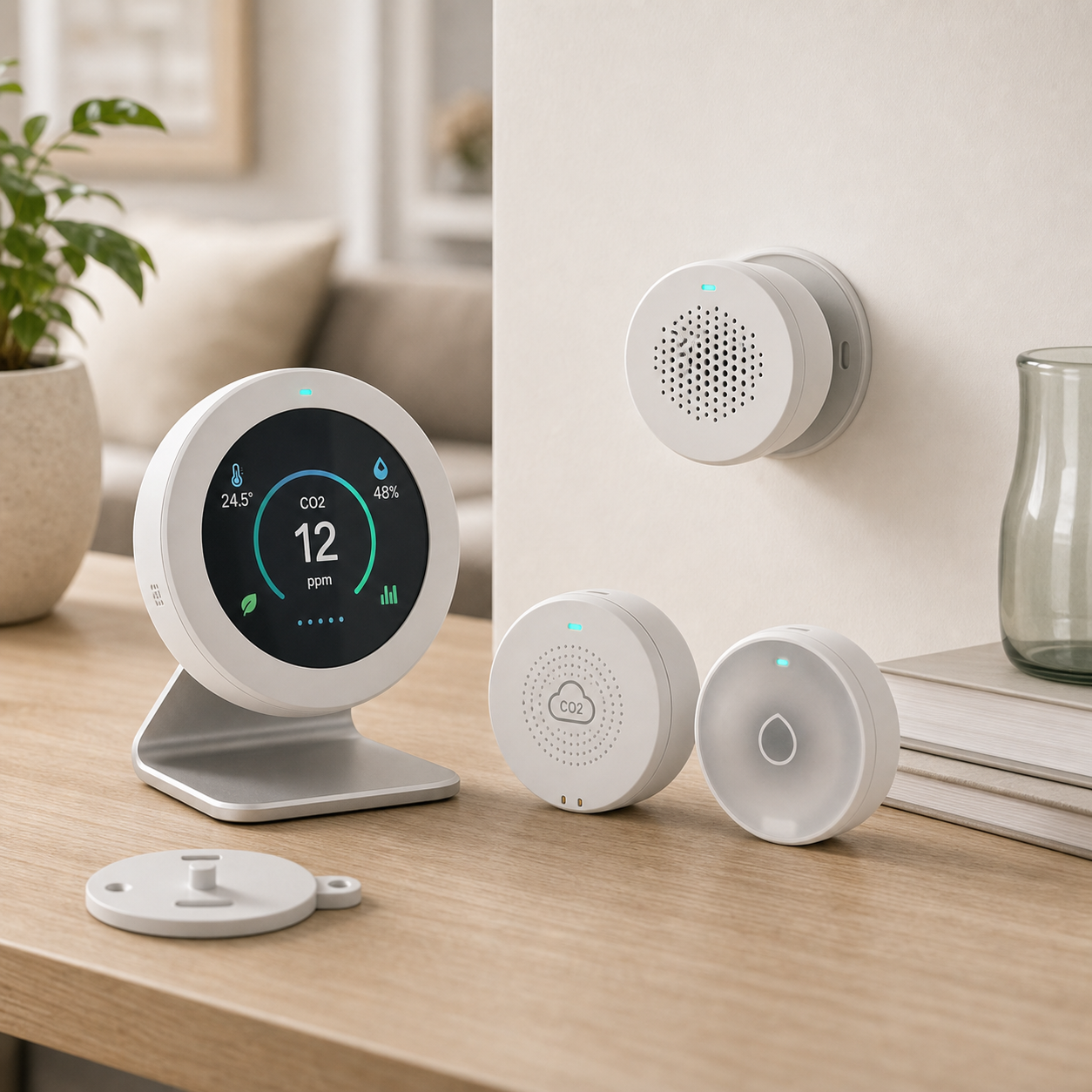
The KudBo air quality monitor kit should be specified with a clear list of actual sensed and estimated outputs. Earlier articles compare NDIR CO2 with eCO2 and discuss sensor limitations. This guide is about the next decision: where the finished unit can sit, stay powered and be read responsibly. It is not a claim that a consumer monitor substitutes for a regulatory instrument or a life-safety alarm.
The topic is relevant to home-office, classroom and workplace procurement. A central office buyer may order identical monitors for very different rooms. One has a nearby outlet and open shelf; another has an HVAC diffuser, restricted Wi-Fi and users who might unplug the device. Those differences need to appear in the installation card and acceptance plan before mass ordering.
State the Question the Monitor Is Meant to Answer
Is the buyer seeking general awareness of one occupied room, a comparison among similar rooms, or an alert for a specific localized source? The objective determines placement. Do not say a single desktop monitor represents an entire building. If a project needs formal occupational or environmental compliance, consult qualified professionals and the correct measurement program.
The U.S. EPA guide to siting air sensors discusses airflow, access, power and indoor placement. It is a useful primary source for planning, not approval of a specific KudBo device. EPA notes that windows, doors and HVAC ducts can create rapidly changing conditions and that sensors should have free airflow. A retail instruction can translate those principles into a concise placement diagram.
Write down what the screen displays and what the sensor actually measures. Particulate matter, CO2, estimated CO2, temperature, humidity and a calculated quality index are not interchangeable. Siting can affect each differently. A buyer should avoid treating a display color as an objective health diagnosis unless the underlying measurement and claim are properly supported.
Compare Candidate Room Locations
Sketch a simple floor plan with occupied zones, doors, windows, cooking or printer sources, air cleaners, heating outlets and power sockets. Select one or two realistic shelf positions and record height and clearance. The EPA's general indoor siting advice favors representative occupied positions with free airflow rather than tucked corners or directly adjacent to a source or sink. The exact setup should still follow the chosen instrument's instructions.
Test a sample at each candidate position under the same ordinary activities for a defined period. Document when a window opened, air conditioning changed or people entered the room. A difference between positions is information about the environment and device response; it is not automatically a sensor defect. Do not publish a numerical percentage comparison without the conditions and a suitable reference method.
Avoid placing the unit where a user can easily spill drinks on it or block its inlet with books. If wall mounting is offered, verify bracket type, screw and power-cable route. A listing that pictures a neatly mounted unit but ships no bracket is incomplete. For a freestanding kit, check whether the device tips when a cable is pulled lightly during ordinary desk movement.
Account for Power and Communications
Power cables can create trip hazards and may be unplugged by someone who needs the outlet. Decide whether the unit runs on mains power, battery or both, then test the actual low-power behavior. If readings disappear when power is interrupted, explain whether history is retained locally, in an app or not at all. A unit that resumes at a default screen may need a user notice.
If a cloud dashboard is part of the offer, determine what happens on a guest Wi-Fi network or when credentials change. The EPA siting guide notes that indoor connectivity can affect placement. For a school or office, ask network administrators before promising easy onboarding; a captive portal or security rule may block an otherwise functioning monitor. An offline display may still be useful, but document which features depend on the network.
The FTC's IoT business guidance encourages clear communication about collected data, security and support. Identify who owns device accounts, what is stored and how a unit is reset before reassignment. Those questions belong to the buyer's deployment plan, not just the sensor specifications.
Interpret Changes Without Overclaiming
An abrupt reading change after cooking or opening a window may reflect a real local condition, a sensor response or both. Look at several observations and document context instead of presenting a single screenshot as a room diagnosis. If the device offers an automatic “good” or “bad” label, request the algorithm and threshold definitions. Do not imply a medical or safety conclusion from an unexplained color bar.
Some sensors need warm-up, calibration or other model-specific care. Ask the supplier which procedures apply and who performs them. Do not copy a calibration instruction from another sensing technology. A printed customer card should identify the first-use wait, placement limit and routine maintenance only as supported by the final model documentation.
For comparative deployment, keep the same configuration, firmware, placement height and observation window. If monitors differ, investigate device revision or setting differences before interpreting the room. A factory test that verifies power-on and display cannot by itself establish field accuracy in every environment.
Mid-Article CTA
Send Your Requirements with room type, parameters of interest, power availability, connectivity and destination market. Email info@kudbo.com to request model-specific sensor and installation details. State whether the product is for general awareness or a specialist measurement project.
Create an Installation Card People Will Use
Show two or three placement examples and two clear “avoid” locations, using a drawing of the actual product. Explain the ventilation openings, supported mounting, cable route, initial startup and what the main displayed values mean. Resist a dense page of generic environmental claims. A buyer can test the card by giving it to a colleague unfamiliar with the model and watching where the unit is placed.
For institutional buyers, include a small site record: room identifier, chosen location, mounting height, nearby sources, power mode, Wi-Fi status and date. A support team can then distinguish a faulty unit from an installation change. This is especially important if facilities staff move a monitor without telling the purchasing team.
Make clear what the product cannot establish. A consumer awareness monitor should not be presented as a smoke detector, CO alarm or certified compliance monitor unless that specific function and supporting evidence exist. Keep the distinction visible in product descriptions and support scripts, not hidden only in a long manual.
Review Evidence and Shipment Preparation
Ask for the component identity, displayed outputs, measurement scope, operating environment, maintenance and current firmware of the exact model. Keep supplier declarations separate from independent reports and from observations in a sample trial. If artwork quotes an accuracy figure, the test conditions and finished-device relevance need review before approval.
Shipment inspection can verify labels, accessories, mounting parts, power-up and selected routine readings under a defined procedure. A controlled comparative sensor study is a different undertaking. Do not describe an inspection photo as proof that every unit provides regulatory-grade measurements. If a sensor, firmware or enclosure changes, assess whether the previous evidence and installation card remain applicable.
| Placement question | Buyer check | Limit to communicate |
|---|---|---|
| Near a vent or window? | Record distance and compare alternatives | Local readings may not represent the room |
| Sufficient airflow? | Check unobstructed inlets | A shelf can block a sensor |
| Reliable power? | Test unplug/restart behavior | History may be interrupted |
| Connected deployment? | Trial the real network type | Cloud functions may depend on access |
Turn Placement into an Acceptance Plan
For a pilot, choose two or three plausible locations and record why each was chosen: ordinary occupied area, near a suspected source and a control spot away from direct emissions. Note window opening, air-conditioning vents, cooking activity and cleaning events. A consumer air monitor can indicate patterns, but one sensor position cannot represent every room or diagnose the source of a pollutant. Repeat readings under comparable conditions before making a placement recommendation for retail customers.
Ask the supplier what each displayed number represents and whether any offset, warm-up or calibration step is required. Some devices estimate a value from a different sensor response. If the box uses the phrase “air quality index,” confirm which index, units and calculation it means. A reassuring color ring can be useful, but a color-to-health claim needs a documented basis. Compare the final manual, app and packaging to prevent three different interpretations of the same display.
For multi-room or office programs, decide who maintains the monitor. Power interruptions, Wi-Fi changes and sensor aging can leave a device connected but uninformative. Include a simple periodic check: physical cleanliness, app connection, date of last reading and a note about events that changed room conditions. This is a support routine, not an assertion that the unit is a regulated instrument or medical detector.
Prepare Support for Common Misreadings
The first support question is often why two monitors in one room disagree. Ask users to compare location, warm-up, airflow and recent activities before calling one unit defective. If a buyer claims calibrated accuracy, it needs the model-specific calibration method and reference conditions. An ordinary consumer monitor may be more useful for identifying changes over time than for making a precise compliance determination.
Create a short troubleshooting card for unusually high readings: move away from direct sources, check cleaning agents or cooking activity, confirm the window and ventilation state, then compare after conditions stabilize. Do not instruct users to ignore concerning symptoms or treat the monitor as a substitute for professional environmental assessment. The role of the product should remain clear: an awareness tool whose limitations are communicated.
For importers, document the exact sensor and firmware configuration on the accepted sample. A component substitution can change response even if the display and case remain unchanged. Ask for notification before any such change and repeat a simple reference comparison. That change-control requirement is an important part of B2B sourcing for instruments that present numeric data.
Match the Display to the Intended Decision
A household may buy a monitor to notice ventilation changes; a facilities team may want a documented trend for several rooms. Ask whether the device can export readings, whether timestamps survive a power cut and how the user distinguishes sensor warm-up from a genuine change. Those are feature questions, not proof that the numbers are regulatory measurements. Make the expected decision explicit: open a window, compare occupied and unoccupied periods, or call a professional for a suspected hazard.
The product page should define each sensor label and unit. A value without a named pollutant or measurement method invites incorrect comparisons with public outdoor monitoring networks. If a device estimates a composite score, explain that it is an interpretation of its available inputs. A colored ring can help users scan the display, but the thresholds and their source should be documented by the supplier. Do not translate a color into “safe” for every user and environment.
At shipment inspection, verify the display, included power supply, language version and basic sensor response under an approved nonhazardous check. A brief response check does not establish calibration over time. For repeat orders, request notification of sensor substitutions and a change-impact review before updating listings.
Frequently Asked Questions
Should an air monitor sit right next to a window?
Usually that is a poor default for a representative occupied-room reading because openings can create rapidly changing local conditions. Follow the particular device instructions and the monitoring objective. A window location may be useful for a specific comparison, but the result should not be treated as the room average without justification.
Can one device describe a whole office building?
No. One unit measures or estimates conditions at its location. A multi-room project needs a defined deployment method, enough devices and qualified interpretation. A consumer monitor should not be promoted as a substitute for formal compliance monitoring without appropriate evidence.
Does Wi-Fi affect the sensor's physical measurement?
The sensing function and online dashboard may have different dependencies. Some devices display locally while disconnected; others may restrict features. Ask for a model-specific offline test and document what remains available when the network fails. Do not assume a cloud-only or fully offline architecture from the housing.
What is a sensible first sample review?
Place the finished device in two documented ordinary room positions, note power and ventilation, and observe its behavior under controlled daily activities. Use the instructions and avoid drawing medical or regulatory conclusions from an informal comparison. Record firmware and sensor identity for later reference.
Can a factory power-on check validate field accuracy?
No. It can show that the sampled unit starts and displays values under defined conditions. Accuracy and field performance require an appropriate method, reference and environment for the specific sensor output. Keep routine inspection and technical validation in separate evidence files.
Conclusion
Placement is part of the air-monitor product. Source a device with clear sensor identity, a usable site plan, stable power and honest interpretation limits. A short, tested installation card can make a restrained product promise more useful than an unexplained “smart air” badge.
Final CTA
For related sourcing questions, browse all buyer guides or the Product Sourcing collection.
Explore the current KudBo product catalog when comparing this guide with available SKUs.
Contact KudBo or email info@kudbo.com with rooms, parameters, quantity and market. KudBo can coordinate a model-specific sample and documentation request so your installation guidance reflects the product actually ordered.