Introduction
A connected weather display needs to tell the truth when it cannot fetch new weather. The KudBo smart mirror weather panel is described as an entryway mirror with weather, reminders and storage. Buyers should verify the exact quoted screen, connection method, app or account requirement and any ongoing data-service costs. A beautiful forecast mockup does not answer what the panel shows after a network interruption.
Earlier guides cover weather data and support and IoT procurement. This article focuses on fallback behavior and stale-data disclosure. The suggested checks are a buyer's pilot plan, not a statement that KudBo has run an outage trial on this unit.
Map Every Data Dependency
Draw a simple data-flow diagram from weather provider to service, home network, mirror and screen. Ask whether the display obtains location automatically or requires manual selection. Determine who owns the data-provider account and what happens if an API key, subscription or supplier service ends. If the quotation mentions an app, get the supported operating systems, update policy and language list for the exact product version.
Weather data has a timestamp and a geographic scope. A current city name on screen does not guarantee a current forecast. Ask how often the device updates, what happens during a failed request and how it distinguishes a cached forecast from a fresh one. An honest interface might show “last updated” or an offline status; the exact design should be tested rather than assumed. Avoid making an emergency-alert claim unless the data source, latency and delivery guarantees justify it.
The US National Weather Service API documentation illustrates that weather feeds have defined endpoints, formats and operating conditions. It does not imply that this mirror uses that API. A buyer needs the actual provider, contract terms and fallback behavior. If a third-party service is embedded, include its cost and continuity risk in the landed-cost analysis.
Run a Controlled Outage Test
Configure the panel as a normal customer would, then disconnect Wi-Fi for a defined period. Record what remains visible: mirror surface, time, saved reminders, weather location, old forecast and any warning. Restore the network and note whether the unit recovers automatically or needs a manual restart. Repeat after a power cycle while offline. A device that shows yesterday's rain icon without any timestamp can be more misleading than a blank weather area.
Test an incorrect date and location scenario. If the unit uses a clock or location setting from a phone, what happens when setup is skipped or changed? A user may move the mirror to another city. The product should allow an understandable location update and show what city the forecast represents. If reminders are stored locally, define whether they survive a network outage and whether they synchronize later; do not infer this from one successful online demo.
Document the firmware and app version for the trial. Software changes can alter weather provider behavior without a change to the physical mirror. Retain screenshots from each state with a test date, but avoid publishing dummy forecast values as if they were real weather at the destination. Consumer-facing instructions should show how to check connectivity and what the stale-data indicator means.
Mid-Article CTA
Send Your Requirements with sales market, intended weather provider, languages and offline-display expectations. Email info@kudbo.com for a system-dependency discussion.
Review Privacy and Account Responsibilities
List what the mirror collects: location, reminders, account identifiers or device diagnostics, if applicable. Ask where data is stored, who can access it, how it is deleted and whether the product can be used without a personal account. A weather display may need approximate location but not a precise address. A retailer should not publish a generic “privacy-safe” claim without understanding the data flow.
The FTC connected-device security guidance provides general principles for updates and data protection. It is not a certification of this mirror. Ask for an update policy, vulnerability-contact process, password or pairing design and a clear factory-reset method. If the mirror is later resold or returned, previous reminders and account data should not remain accessible.
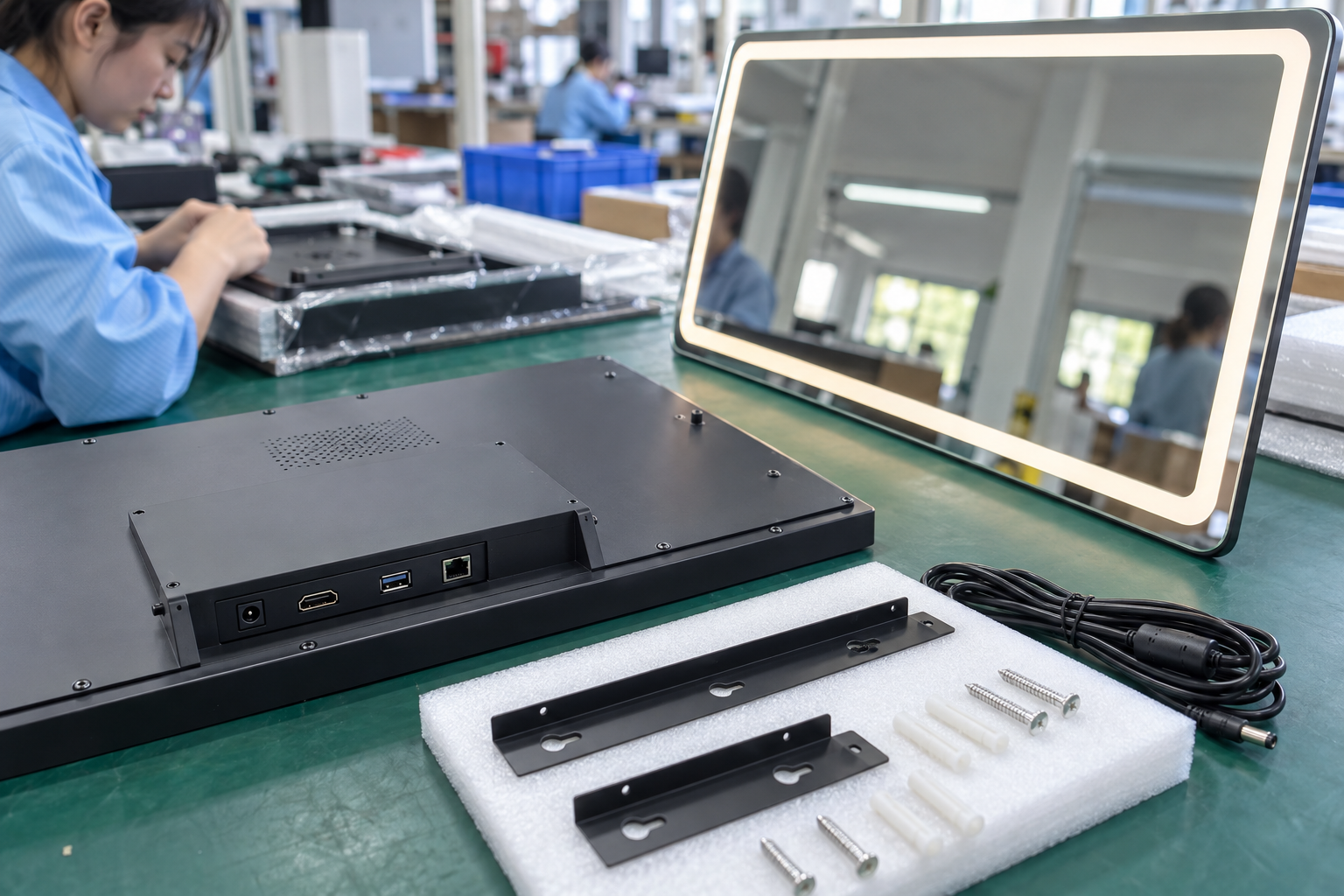
At shipment inspection, check the mirror surface, mounts, cable, display, instructions and onboarding path. A test account should not be shipped logged in. If the product requires a specific wall fixing, packaging should communicate that before purchase. The mirror remains a physical furnishing even when the weather feed is down; inspect ordinary mirror quality and installation guidance as carefully as software.
Deployment and Support Scenarios
A small hotel, retail store or office entryway may use the mirror differently from a household. A shared installation needs a designated administrator, a way to change location and a routine for clearing reminders when occupancy changes. If the device is sold only for household use, do not infer suitability for public spaces. Shared users may also need a different privacy notice. The buyer should write down the intended environment before choosing an account model.
Customer support should have a simple decision tree: check power and display, identify current city, inspect last-update time, verify network, then determine whether the data service is available. Do not ask the customer to disclose a password. If the service is down, the user should see an understandable status rather than troubleshooting a healthy home network for hours. The retailer needs a supplier escalation contact for data-feed incidents and an expected communication channel for planned changes.
For a product page, show a real mirror surface under normal room lighting as well as the digital display. Avoid a futuristic render that hides reflection quality or mounting. State which functions remain available offline if verified, and which require a network or account. A truthful outage paragraph can increase buyer confidence because it shows the supplier understands the product's lifecycle, not just its first five minutes on a demo wall.
An Outage Drill for the Retail Team
Before launch, the retailer should run an outage drill with the exact device and app version. Start with a correctly configured location and a known last-update timestamp. Disconnect the home network without switching the mirror off. Observe whether the forecast freezes, disappears or is marked stale. Let the display remain offline long enough to see whether it changes state after a timeout. Then restart the device while still offline. A device that behaves well during a brief router reboot might show a different screen after a cold start.
Next restore the network. Record whether the unit reconnects automatically, how long it takes to refresh and whether stale reminders duplicate or disappear. If the service uses a cloud account, sign out and repeat part of the test. A support team needs to know whether “no weather” is caused by a network issue, an expired account, a provider outage or an incorrect city setting. The published instructions should include the simplest checks without requiring a user to open electrical components or expose account credentials to support staff.
Test the display with a deliberately changed location. A customer who moves home should be able to update the city without factory-resetting all reminders. If location is inferred from a phone, confirm what happens when the phone is absent. A weather tile that shows the wrong city without a visible label could be misleading. For an entryway display, useful information often depends more on clear city and timestamp labeling than on animated forecast graphics.
Service Continuity and Physical Installation
The purchase order should identify who is responsible for the weather feed, app updates and security maintenance. Ask how long the supplier expects to support the service and what notice a retailer receives before a provider changes its API. If the product can still serve as a normal mirror when the digital service ends, that is a useful fallback, but do not use it to excuse an undisclosed subscription dependency. Calculate support costs across the expected retail life, not only at the moment of hardware shipment.
Privacy settings deserve the same practical review. Use a dummy reminder containing non-sensitive text, then delete it and confirm it is gone after a reset or account transfer. Ask how a customer can export or erase data and whether a returned device is cleared before resale. A retailer should not promise deletion solely because the screen looks blank. If a camera or microphone is not included, do not imply it exists in product imagery; if either is included, identify its state and access controls explicitly.
Finally, inspect the wall or shelf installation. A weather panel may be light electronically but heavy as a mirror. Confirm mounting hardware, wall requirements and cable concealment for the quoted size. A good software fallback does not compensate for unsafe physical mounting. At shipment inspection, compare the glass, mount, display, power supply and instructions with the approved reference. Keep a clear revision record so support answers remain tied to the actual unit sold.
Launch Checklist for a Connected Home Product
The launch team should review the hardware, data source and support service together. Confirm the mirror dimensions, mounting method and power supply on the final carton. Confirm that the forecast provider and API terms match the regions where the product will be sold. Confirm app availability, supported phone operating systems, account requirements and a documented update policy. An attractive hardware sample can still become unusable if the associated app cannot be installed in a destination market.
Run the offline drill once on the production firmware, not only on an early prototype. Check Wi-Fi loss, power loss, wrong location and account sign-out. The support guide should show what each state looks like and when weather information is stale. If a retailer uses a live display in a showroom, a staff member should know how to identify a data outage without improvising false forecast numbers. Do not stage a weather alert that the device cannot actually deliver.
The privacy file should state what data is collected for location and reminders, where it is stored, who can access it and how it is erased on return. Keep those terms understandable for buyers; a long policy alone does not explain the day-to-day account flow. If the mirror has no camera or microphone, show the actual hardware rather than adding an interface icon that implies those features. If it has either, describe permissions and physical indicators accurately.
At shipment inspection, compare a sampled device with the approved reference for display, mirror surface, mount and onboarding. A brief live forecast check establishes connectivity in that test environment, not permanent service availability. A complete release record should pair that check with the supplier's ongoing service commitments. Connected products are purchased as systems with a lifecycle, not as isolated screens.
Frequently Asked Questions
What should a weather mirror show while offline?
That depends on the design, but it should clearly distinguish stale or unavailable weather from fresh information. Test the exact sample after network loss and power cycling.
Can a mirror provide emergency weather alerts?
Only if its actual provider, update path, latency and product design support that claim. A decorative forecast should not be presented as a safety-critical alert system.
Does an entryway mirror require a user account?
The answer is product-specific. Verify onboarding, local functions and what happens if the account or service is unavailable.
Are saved reminders private?
Not automatically. Ask what is stored locally or remotely, who can access it, and how a customer deletes it before transfer or return.
What should a buyer ask about ongoing costs?
Provider fees, app maintenance, firmware updates, support staffing and service continuity. The hardware quote alone may not cover these responsibilities.
Conclusion
A smart mirror is credible when its displayed information has a known source and a graceful failure state. Buyers should test network loss, stale forecasts, account deletion and software support before writing connected-home claims. That turns a decorative demo into a supportable retail product.
Final CTA
Contact KudBo at info@kudbo.com with data and support requirements. Review KudBo products, buyer guides and product sourcing articles for adjacent connected-home decisions.