Introduction
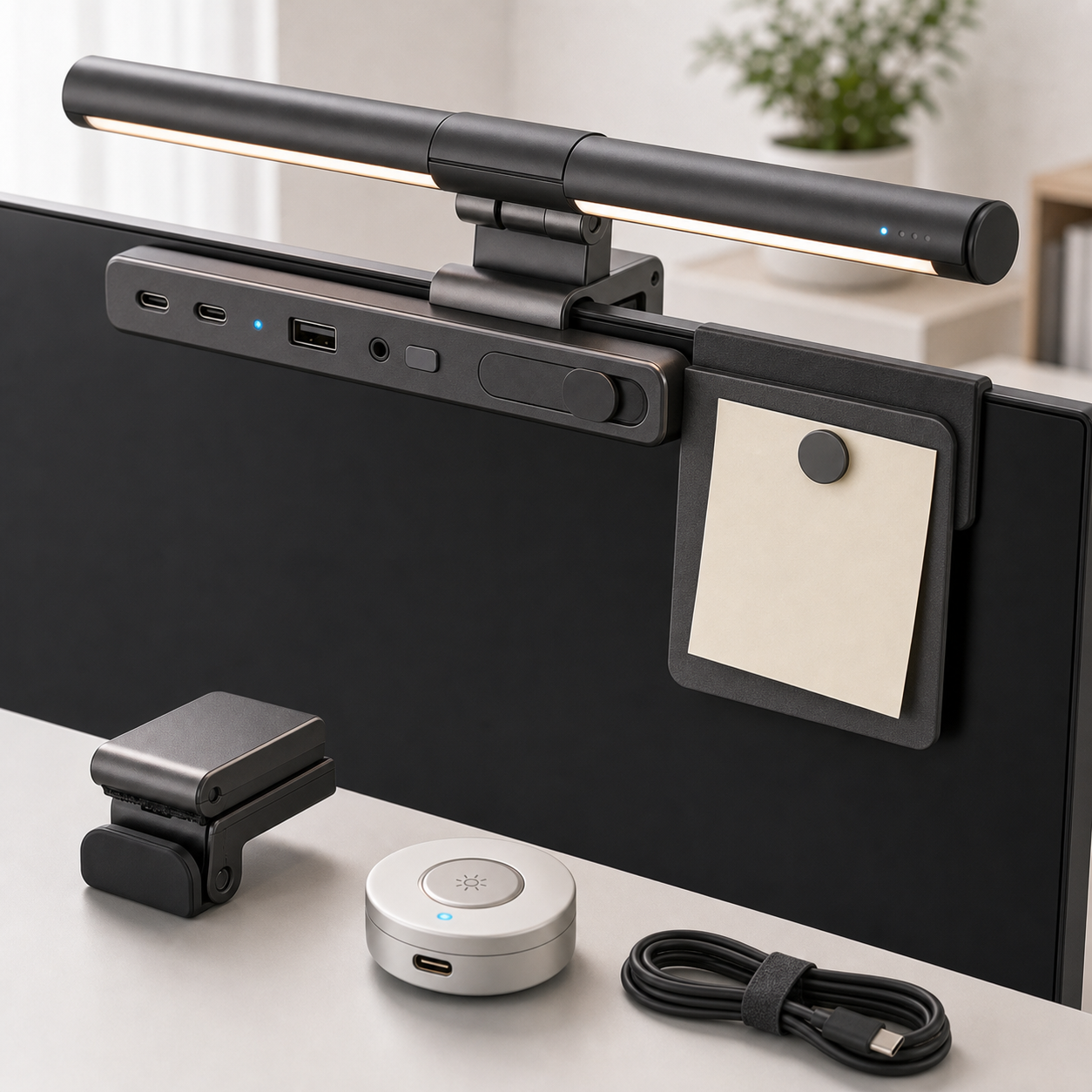
A monitor light bar should light the work surface without turning the screen into a mirror. The KudBo monitor light privacy hub combines lighting, privacy and desk-organization concepts. Buyers should confirm the specific light, shutter and hub components in the quoted version. A beam pattern that works above one matte flat panel may create glare on a glossy or curved display; a mechanical shutter can also fail to cover a camera whose position differs from the sample.
The compatibility buyer guide covers broad fit. This article splits optical performance from privacy functionality so that one successful feature does not mask the other's weakness. The proposed tests are sample-review methods, not reports of completed KudBo optical or security testing.
Test Light on Several Screen Types
Select a flat matte monitor, a glossy display and a curved panel if those are relevant to target customers. Attach the bar as instructed and set a normal seated eye position. Put a white document and a dark document on screen, then observe reflections with the light at each advertised mode. Change ambient light from daytime office to dimmer evening conditions. A camera may hide a reflection by exposure adjustment, so note direct human observations.
Check illumination where hands actually work: keyboard, notebook and desktop immediately in front of the screen. A narrow strip of light can produce an attractive photo while leaving the writing area dark. If brightness or color-temperature figures will be advertised, request a measurement method and tolerance for the final product revision. Avoid claiming that a light prevents eye strain without suitable evidence; a glare-free layout is an observable design goal, not a medical promise.
The OSHA computer-workstation guidance and workstation-environment advice offer general context for positioning, reflections and visual comfort. They do not certify a particular bar. Use them to structure a desk review rather than as a badge of compliance.
Check Mounting Geometry and Cables
Record display top-edge thickness, rear curvature, bezel shape and webcam position. A clamp may fit a slim monitor but collide with a built-in camera or ventilation slot. Test stability while adjusting the light angle, cleaning the monitor and moving the desk. Do not advertise “fits all monitors” without a meaningful fit range. Include any counterweight, pad or adapter in the bill of materials.
If the bar uses USB power, identify the input specification and cable length. A port on the monitor may switch off in sleep mode; a separate power source may be needed, depending on the design. Cable routing should not press against the screen panel or interfere with stand tilt. If the product has a hub feature, enumerate supported ports and functions on the exact version. A USB-shaped connector does not automatically indicate data, video or a particular charging standard.
Inspect thermal comfort, controls and indicators in an evening test. A touch control behind the bar may cause the user to tilt it each time. A bright status LED can be more distracting than the light it controls. A simple control that remembers a chosen setting may be valuable if genuinely supported; test after disconnecting power rather than assuming memory.
Mid-Article CTA
Send Your Requirements with monitor sizes, finish, webcam type, power source and desired hub ports. Email info@kudbo.com for a fit matrix and sample discussion.
Treat the Privacy Shutter as a Mechanical Claim
Close the shutter and verify it covers the actual camera lens on each monitor or webcam type claimed compatible. A piece that slides over a bezel without blocking the optics offers little physical privacy. Check whether the shutter leaves an indicator visible or creates confusion about camera state. Do not call the accessory a full cybersecurity solution: a physical cover addresses one camera exposure path, not microphones, malicious software or data access.
If the shutter is adhesive, test clean removal on compatible materials and check whether it blocks the laptop from closing if laptop use is claimed. If integrated with the light clamp, verify alignment after the bar is repositioned. Product photography should show the shutter both open and closed, with the camera placement visible, instead of relying on an abstract lock icon.
At shipment inspection, verify clamp pads, beam controls, shutter travel, cable and labeled ports against a retained sample. Keep revision-specific compatibility notes; a changed magnet, adhesive or clamp spring can affect both optical and privacy performance. Use a pilot group to document actual monitor models and failure reasons so fit guidance improves after launch.
How to Handle a Failed Compatibility Test
When a light bar does not fit a monitor, record why: bezel too thick, curved rear housing, webcam collision, unstable counterweight or cable too short. Each can lead to a different response. A clip adapter may fix one geometry but not a blocked ventilation slot. An external webcam may be movable; a built-in one may not. The buyer should not force the sample into place merely to create a successful photograph.
When glare fails, identify whether the beam can be redirected within the product's intended adjustment. If the only workable position leaves the keyboard dark, the desk combination should be excluded from compatibility guidance. A complaint about “too bright” may be solved with a mode setting; a reflected stripe on a glossy display may require a different optical design. Keep these categories separate so the next production revision targets the actual problem.
If the shutter does not fully cover the lens, do not market it as a privacy feature for that webcam. A small misalignment matters even if the cover slides smoothly. The claim should be about physical lens coverage where verified, not broad cyber protection. Honest exclusion lists can be a sign of professional sourcing, especially for mixed-monitor office deployments.
An Optical and Privacy Acceptance Sheet
Do not combine light and privacy into one pass/fail score. On the light side, record monitor model and finish, bar position, desk depth, ambient lighting, selected mode, observed screen reflection and the area of the keyboard or notebook that receives useful light. On the privacy side, record webcam location, shutter attachment, open and closed positions, whether the lens is fully covered and whether the shutter stays in place after repeated sliding. These are distinct functions with distinct failure modes.
The optical test should include a dark screen and a light document because reflections can be easier to see on a dark field. A user should observe from their normal seated position, then lean slightly left and right. If the bar creates a bright stripe on a glossy monitor, try only the supported adjustment positions. Do not tilt a monitor into an ergonomically awkward position merely to make the bar look good. If the beam improves one desk but not another, the product page should identify the intended setup rather than promise universal glare elimination.
For the shutter, use a real camera preview to confirm whether the lens is blocked; simply covering a decorative indicator is not enough. Test webcams located above, within or beside the bezel if the product claims broad compatibility. A mechanical cover can be useful even when software reports the camera off, but it is not a complete privacy solution. The buyer should avoid suggesting it blocks microphones or network access. If the cover uses adhesive, check that it can be removed according to instructions without damaging a common finish.
Desk Setup, Power and Support
Repeat the mounting trial after changing monitor height and tilt. A clamp may feel secure when the display is upright but loosen when the monitor is adjusted. Check whether the light bar conflicts with an external webcam, monitor hood or VESA arm cable path. Photograph the complete back-of-monitor setup; hidden cables can be a major source of poor customer experience. If the product requires a separate USB power supply, show it as customer-supplied unless included in the quote.
If a hub function is advertised, create a port table with type, data function, charging support and any limitations. A physical port does not prove every protocol. Keep the electrical test separate from the optical one, especially if a variant removes a port but retains the same exterior. Ask for a revision code on the packaging and instructions so returns can be matched to the correct configuration.
At shipment inspection, check clamp pads, hinge or pivot feel, shutter travel, cable, lights and any port labels against the approved sample. A sampled beam check can find dead LEDs; it cannot prove that every customer's monitor will be glare-free. Customer support should ask for the display finish, top-edge thickness, webcam type and a photo of the installed position before offering a fit remedy. Those specific inputs are more useful than an unsupported universal-fit claim.
Office Rollout Versus Individual Desk Use
An individual buyer can test a bar on one monitor and return it if it does not fit. An office buyer needs a monitor inventory before ordering many units. Group displays by top-edge geometry, finish, webcam position and available USB power. Pilot one sample in each group. A compatibility statement for one flat matte display should not be applied to curved or glossy models without observation. This simple grouping can prevent an expensive deployment of lamps that create glare on a large share of desks.
Office privacy policy should also define how the shutter is used. A physical cover may provide a visible cue, but it does not change application permissions or audio capture. A retailer should describe it as a lens cover where it actually covers the lens. Ask whether employees with external webcams need a different shutter. A mixed fleet may be better served by separate light and privacy products than by one combined accessory.
Installation and cable management affect the total rollout cost. Determine whether the bar can draw power from the monitor's USB port after sleep, whether an adapter is included and how the cable reaches the desk without interfering with height adjustment. A small pilot should include monitor-arm motion and webcam meetings. A bar that is excellent for reading paper but obstructs the camera is not a complete office solution.
Keep the final acceptance sheet by monitor group and product revision. If a supplier changes clamp pads or optics, repeat the relevant group tests. The result can inform an honest compatibility table that helps both business purchasers and individual customers choose correctly.
Frequently Asked Questions
Will a monitor light bar eliminate all screen glare?
No universal claim is justified. Screen finish, beam angle, ambient light and user position change reflections. Test representative monitors under realistic conditions.
Does a webcam shutter provide complete digital privacy?
No. It can physically cover a camera lens when correctly positioned, but it does not address microphones, account access or other data-security risks.
Can the light fit a curved monitor?
Only if the clamp geometry and balance work with that monitor's top edge and rear shape. Publish a tested range or model list rather than assuming compatibility.
Does a USB port on the product always support charging and data?
No. Confirm each port's exact function and power specification on the quoted version. Connector appearance is not sufficient.
What images should a retailer use?
Show the complete kit, a truthful beam on the desk, a representative screen-reflection view and a close-up of the shutter covering a real lens.
Conclusion
Light quality and camera coverage are separate purchasing decisions. Buyers should verify both on real monitors, include power and clamp fit in the test, and describe privacy narrowly. That produces a useful desk accessory without overpromising glare reduction or security.
Final CTA
Get a Quote at info@kudbo.com with your display and port matrix. Compare KudBo products, the blog and product sourcing guidance when planning the pilot.