Introduction
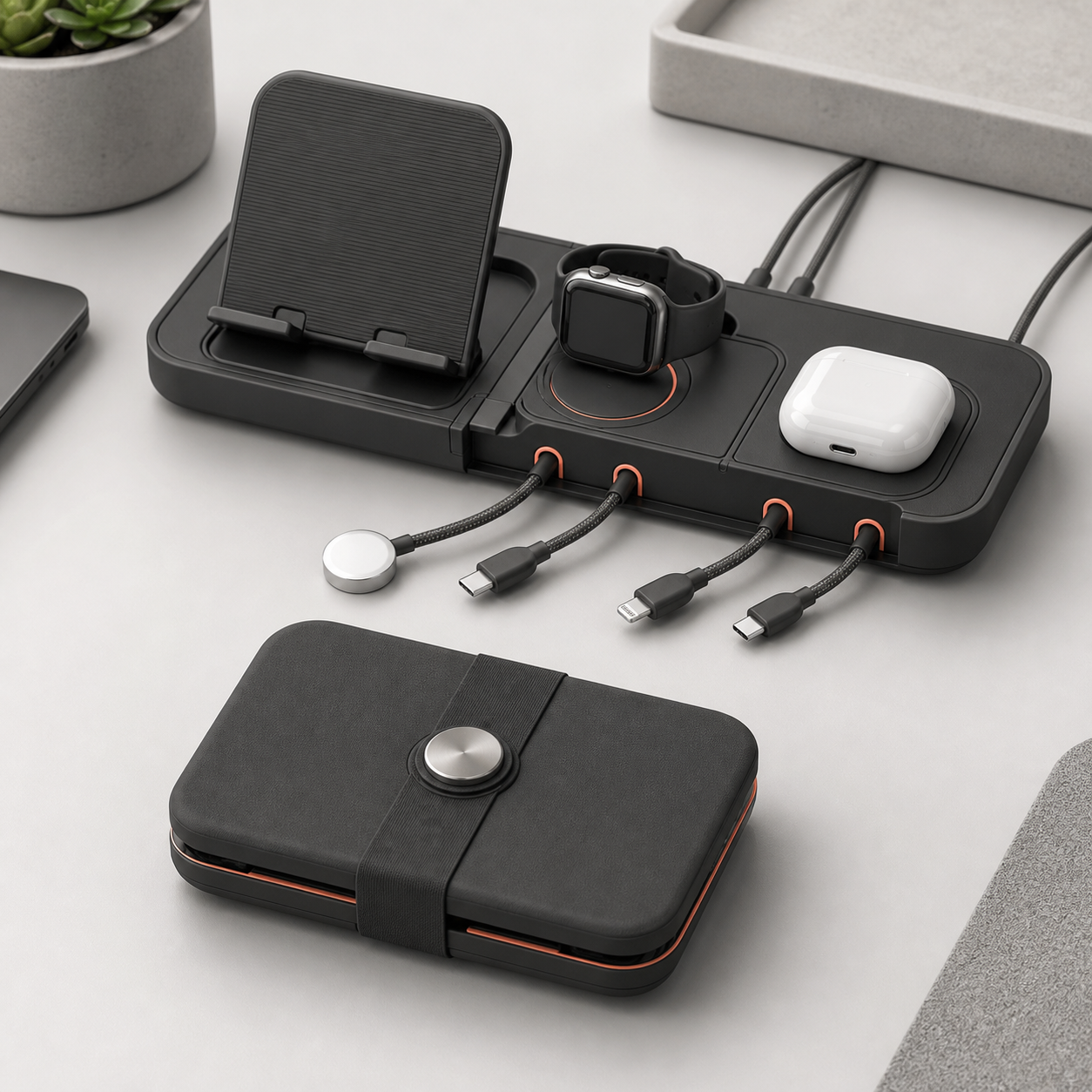
A magnetic dock can hold a cable neatly while still creating a poor electrical or ergonomic fit. The KudBo magnetic cable dock is described as a foldable desk accessory with a phone stand, cable clips and a watch-puck holder. Buyers should verify the exact quoted arrangement. A magnet's ability to hold a part, a cable's ability to charge a device and a connector's durability are three different properties.
The related retail fit sourcing guide covers broad positioning. This guide concentrates on retention and cable strain during repeated pick-up, set-down and charging. The procedures are proposed sample checks, not completed factory-test results.
Write a Compatibility Matrix Before Photography
The USB-IF cable and connector resource distinguishes documented cable functions and certification paths; buyers should still validate the exact included cable and charger combination.
List the device families, dimensions and case thicknesses relevant to the target market. Separate magnetic attachment from passive support on a shelf or lip. A phone in a slim case may attach differently from one in a thick protective case. If a dock is described as compatible with a particular magnetic charging system, ask what component supplies that function: an included charger, an insert supplied by the customer or a purely mechanical magnet. Do not imply electrical charging because a phone attaches magnetically.
Include the watch-puck holder in the matrix. Many pucks look alike but differ in diameter, cable exit, depth and retention method. Determine whether the quoted SKU includes a puck at all. Photograph the retail pack with all included items separated from customer-supplied devices and cables. This simple boundary prevents a common listing error: a fully equipped lifestyle scene that suggests a charger is bundled when only a holder is sold.
The USB-IF logo licensing information is useful if a supplier proposes using official USB marks. A connector shape alone does not authorize such marks or establish a supported charging rate. Request connector, cable and power information for the exact configuration. Keep performance claims tied to supported devices, charger and cable rather than a generic “fast charging” slogan.
Evaluate Retention in the Direction People Actually Pull
Put a representative phone on the stand and remove it in a natural motion. Does the dock slide across the desk, unfold unexpectedly or bring the cable with the phone? Repeat with light and heavy cases. A vertical pull-force figure, even if measured, cannot substitute for this use sequence. Direction, case, surface friction and cable tension all change the experience.
Inspect cable clips with the actual cable outside diameters. A tight clip that grips well at first may compress or abrade a soft cable jacket over time. A loose clip may not hold the cable when a user raises the phone. Route each cable through the dock and examine the bend at the connector when the device is resting, being picked up and being placed back. If the connector becomes the main strain relief, redesign or change the routing before scale production.
Fold and unfold the dock repeatedly, checking whether cable paths are trapped at the hinge. Record whether the stand's angle drifts under a device load. A hinge can feel firm in an empty sample but move when a phone is tapped. Set a realistic tapping task, such as dismissing a notification while the phone remains supported, and observe stability. Do not publish a universal device-weight capacity unless tested with a defined setup.
Mid-Article CTA
Send Your Requirements with device families, case range, included-versus-customer-supplied chargers and packaging format. Email info@kudbo.com to request a sample compatibility review.
Check the Desk, Not Just the Device
The base must be compatible with likely desktop finishes. Inspect feet or pads for slip, residue and staining on wood laminate and glass. A heavy adhesive pad may hold the dock but make it hard to reposition; do not assume users want permanent attachment. If the product folds for travel, consider how cables are wrapped, how magnets attract small metal objects in a bag and whether the product can be cleaned without exposing an adhesive or electrical insert.
If the dock relies on a customer-supplied charging puck, provide a readable installation diagram and a non-destructive removal method. Ask how replacement pucks or changed cable designs will affect the holder. A seemingly minor cable-exit change can make a tight insert unusable. The buyer's change-control specification should cover magnet location, holder diameter, clip aperture, hinge geometry and foot material.
At shipment inspection, count every cable clip, check hinge travel, magnet placement and product finish, then run the agreed mechanical fit check. An inspector can verify that the dock holds a reference device and cable; it cannot certify every third-party device on the market. Keep the online compatibility table narrower than the evidence. A clear limitation can reduce returns more effectively than a broader headline.
Specify a Retail Compatibility Claim
The compatibility chart should name each tested combination or an explicit dimension range, including case thickness and cable shape. A statement like “works with all magnetic phones” is unlikely to survive variations in magnet layout, case material and charger puck. If the dock uses a separately purchased charging element, tell buyers how to identify that element and install it. An in-use photo may show a working charger, but the product page must still state whether it is included.
Consider transport. A folding dock may be carried in a bag with keys and other metal objects. Ask whether the hinge locks closed and whether magnets attract loose objects that could scratch the surface. Confirm that any cable can be removed before folding or routed without being pinched. A compact product is not necessarily a travel product unless this sequence works. If it is intended only for a fixed desk, say so.
For repeat orders, capture fixture dimensions and a reference cable set. A supplier changing clip plastic, magnet grade or foot material should notify the retailer because any of those can change retention. The customer-support matrix and product imagery can then be updated for the new revision. This is more credible than keeping an old compatibility list indefinitely while the hardware evolves.
A Five-Device Desk Pilot
Set a small matrix of actual devices or dimensionally accurate test pieces rather than relying on marketing renders. Include a light phone, a heavier phone, two protective cases and the watch puck size relevant to the target market. For each, record where the phone rests, whether the magnetic area aligns and whether a charging cable can reach without a sharp bend. If the dock sells without the devices or charger, the pilot report should say so explicitly. This prevents the compatibility list from sounding like an in-box feature list.
Place and remove each phone repeatedly while the cable is connected. Observe whether the magnet pulls the cable connector sideways, whether the stand shifts on the desk and whether the hinge angle drifts. A cable clip that retains a cable perfectly when the phone is stationary may release it after several removals. Check both smooth and textured desks. Document the desk surface, case thickness and cable diameter for every result. “It held five phones” is less useful than a matrix showing which combinations did and did not work.
Now deliberately change one condition: use a slightly thicker case or a cable with a rigid strain-relief boot. This is not an abuse test; these are common consumer variations. If the dock's fit window is narrow, the listing should state it. If a customer-supplied watch puck slides into a holder, test installation and removal without a tool or excessive force. A puck that can only be removed by pulling its cable is likely to cause damage and complaints.
When the pilot is complete, the quote should identify base finish, pad material, magnet and clip revision, included accessories, tested device range and what remains customer-supplied. At shipment inspection, compare these points against a retained reference unit. An inspector can check mechanical placement and hinge action, but electrical charging performance depends on the complete charger-cable-device system. Keep those records separate so a mechanical pass is not advertised as charging certification.
Retail Return Triage
Plan a support question for each likely complaint: “phone falls” asks about device and case; “doesn't charge” asks whether a charger is actually included; “cable frays” asks for a photograph of routing and clip edge; “stand slips” asks about desk surface. Do not ask customers to send sensitive device information when dimensions and a photo will do. Group pilot returns by actual cause. If the same thick-case issue repeats, update the compatibility chart before increasing advertising spend.
Replacement parts are part of credibility. A cable clip can be a small inexpensive component, but only if its revision is recorded and a matching spare can be supplied. A changed watch holder or magnet position may make a spare from a later batch incompatible. The buyer should keep component drawings and change notices, especially for private-label programs where the external styling stays identical while internal fixtures change. That small procurement discipline can prevent a long tail of confusing support cases.
Variant Strategy for Wholesale Buyers
A retailer may want one simple organizer variant and another configured with charging hardware. Keep their bills of materials and images separate. The simple variant can be presented as cable management and phone positioning, with customer-supplied cables. A powered variant needs an electrical specification, test evidence, included charger details and destination-market review. Do not use the same “fast charging” headline across both simply because the bodies look alike.
Consider a corporate-gift order. A purchaser may not know recipients' phone and watch models, so broad device-compatibility claims are tempting. A safer offer can emphasize adjustable positioning and specify the compatible charger or puck range. Ask for a small recipient-device survey or offer a non-powered desk version when uncertainty is high. A desk accessory that holds a range of cables without charging may be more universally useful than a tightly fitted proprietary charging insert.
For an e-commerce listing, publish the dock's dimensions, fold height, maximum supported device size under the tested setup, compatible cable diameters and any case limitation. Show a top view that reveals the clip apertures. If a watch puck is not included, show the empty holder before the lifestyle image. Buyers should be able to tell exactly which parts arrive. This reduces returns from customers expecting a charging system when they purchased a holder.
At shipment inspection, distinguish mechanical and electrical checks. Test hinge operation, foot adhesion, clip finish and magnet position on all variants. For a powered SKU, perform the agreed charger test with a documented reference device and cable. A pass on one reference combination should not become an assertion that all phones charge at the same rate. Version each matrix and photo set so a changed magnet or connector does not silently inherit obsolete claims.
Frequently Asked Questions
Does a magnetic cable dock always charge a phone?
No. It may only position a phone and route a separate cable or charger. Confirm what electrical component, if any, is included and which devices and power setups are supported.
How should magnet retention be tested?
Use representative devices and cases, natural placement and removal directions, and the real cable attached. A single pull-force number cannot describe every use condition.
Can cable clips damage charging cables?
They can if the aperture, edge finish or routing creates repeated sharp bends or abrasion. Check soft and stiff cables and inspect the connector after repeated pick-up cycles.
Is a watch charging puck included?
Only if the quoted bill of materials says so. A holder for a customer-supplied puck should be described clearly and sized against a specific compatible range.
What should a private-label buyer photograph?
Show the bare dock, complete retail kit and one realistic in-use setup. Label phones, watches and chargers as props if they are not supplied.
Conclusion
The purchase decision is a compatibility and strain-relief decision. A dock that is attractive when empty can still fail when a case is added or a cable is pulled repeatedly. Test the complete device-cable-desk routine, define the in-box boundary and keep charging claims tied to the actual electrical system.
Final CTA
Get a Quote by sending target device sizes and a component list to info@kudbo.com. Explore the KudBo catalog, blog and product sourcing articles while planning the sample matrix.