Introduction
The best classroom microscope kit is not necessarily the one with the largest magnification number. Teachers need a unit they can set up before a lesson, a specimen process that is safe for the age group, and a clean way to store all components afterward. Those requirements are different from a single-child product photo and should be part of a wholesale specification.
The KudBo kids digital microscope is relevant to learning retailers, STEM gift programs and group activities. An earlier guide covers age grading and battery compartments. This one focuses on the repeated classroom workflow: planning a lesson, preparing specimens, supervising use and restoring the kit for the next group. It does not claim that a particular model has been tested in a school.
Start with the Lesson, Not the Specification Sheet
Write down what learners should observe: textile weave, leaf surface, coin detail or a prepared slide. A visible real-world subject lets a buyer compare optics and handling under plausible conditions. Avoid living, hazardous or sharp specimens unless a qualified educator has approved the procedure. If the kit's specimen cards use photographic examples, make clear whether they are observation guides rather than actual slides.
The Nikon microscopy education material on gross observations illustrates the value of matching a microscope method to the material being studied. It is not an endorsement or performance test of a children's retail microscope. For a buyer, the useful principle is to judge whether the kit reveals the detail promised by its lesson material.
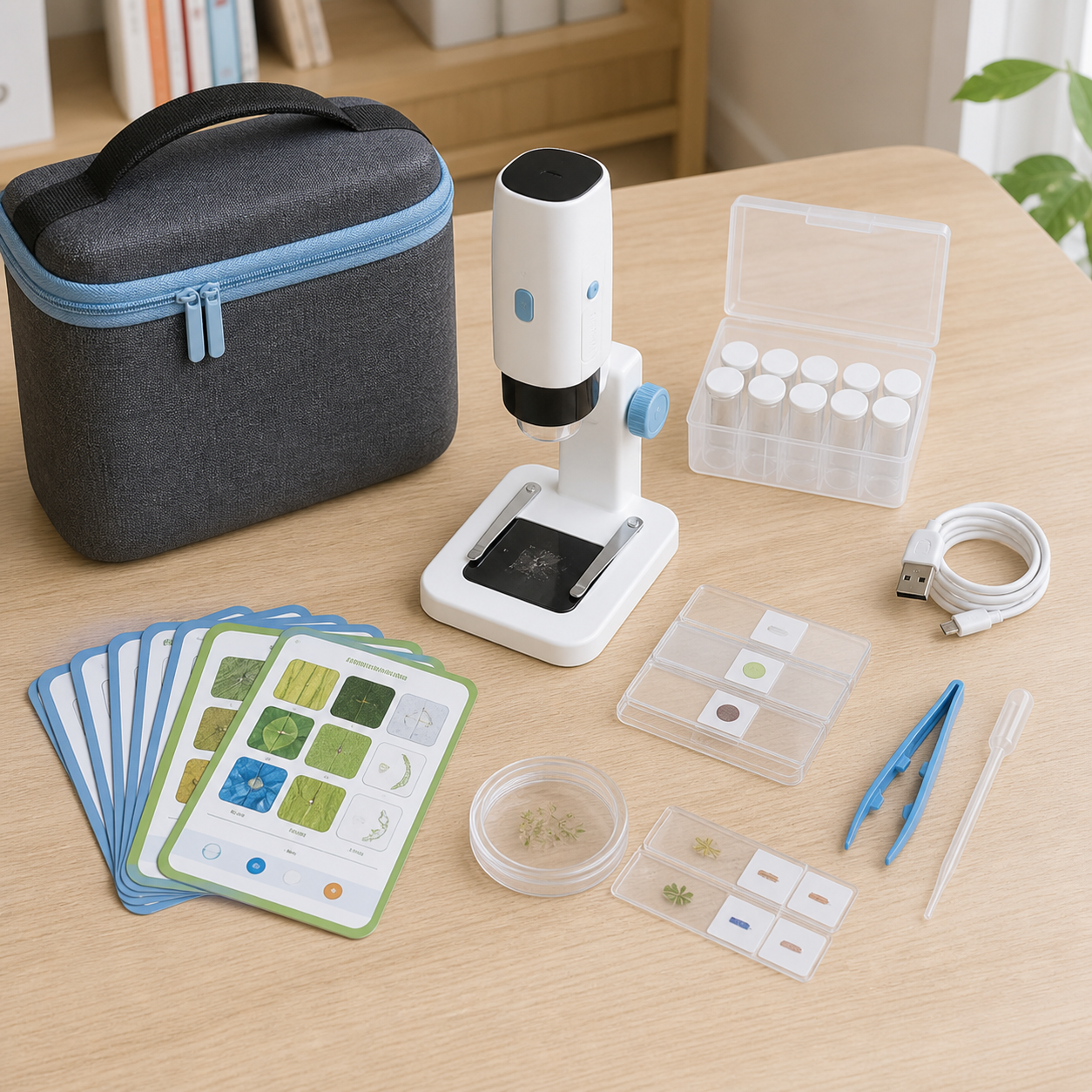
Ask for one complete lesson kit, not just the optical unit. Count slides or sample holders, tray compartments, charging cable, cleaning instructions, carrying case and any required phone or computer connection. If an app is necessary, verify its current support and account requirements. An optional app should not be photographed as included hardware.
Define Age and Supervision Boundaries
Ask the supplier for the intended age range and the documents applicable to the destination market. Inspect small detachable pieces, battery access, cable routing and specimen tools. A tweezer and a slide may be appropriate under teacher supervision but not for unsupervised younger children. The CPSC small-parts guidance is a useful U.S. reference; it is not a substitute for a product-specific assessment.
Use clear teacher-facing instructions. Specify which pieces should be issued only after the device is positioned and which should be collected first. If students prepare their own specimens, list allowed materials and protective steps. Do not imply that classroom suitability follows automatically from a colorful housing or a “STEM” label.
For retail packaging, inspect whether the age marking, included items and claims agree across the box, manual and online listing. A buyer should resolve conflicts before accepting artwork. If the product is marketed as a toy in a given jurisdiction, request relevant evidence for that classification. If it is sold as an educational instrument, ask what safety and electrical requirements apply to that configuration.
Sample the Whole Observation Sequence
Run a timed practice lesson using production-intent samples and ordinary room lighting. Have an adult open the case, install or charge the device, position a sample, adjust focus, save or view an image where supported, then clean and repack. Record where instructions were unclear. This proposed test is for buyer acceptance; it is not a claim that KudBo has produced a performance result.
Look for focus drift when the specimen tray is touched, unstable stands, overly narrow working space and a screen that is hard to see at a shared table. Define a small set of reference objects and capture conditions so different samples can be compared consistently. Magnification can be stated only with the underlying optical or digital method explained. Digital zoom alone does not create new specimen detail.
If a phone or tablet is required, verify supported sizes and operating systems before ordering classroom sets. Ask whether multiple units can operate in the same room without pairing confusion. Keep any sample photos fictional or free of personal data. A lesson should still work when school policy restricts internet accounts or cloud upload, if that is a customer requirement.
Mid-Article CTA
Send Your Requirements with target student age, group size, observation subjects, power and storage arrangements. Email info@kudbo.com for a model-specific component and lesson-preparation checklist.
Prepare a Repeatable Cleaning and Storage Routine
Classroom use means many hands touch the focus control, tray and case. Ask which surfaces may be wiped, which lens areas need a specialist cloth and which cleaning agents are prohibited. A general claim such as “easy to clean” is not enough for a school procurement team. Test the proposed wipe procedure on the sample's finish and printed marks before approving a manual.
Separate consumables from reusable parts. A prepared slide, transparent film and paper observation card may each have a different cleaning or replacement path. Price replacement packs in the quote if teachers are likely to run repeated activities. If the supplier cannot supply them, the lesson plan should avoid depending on parts that are easy to lose.
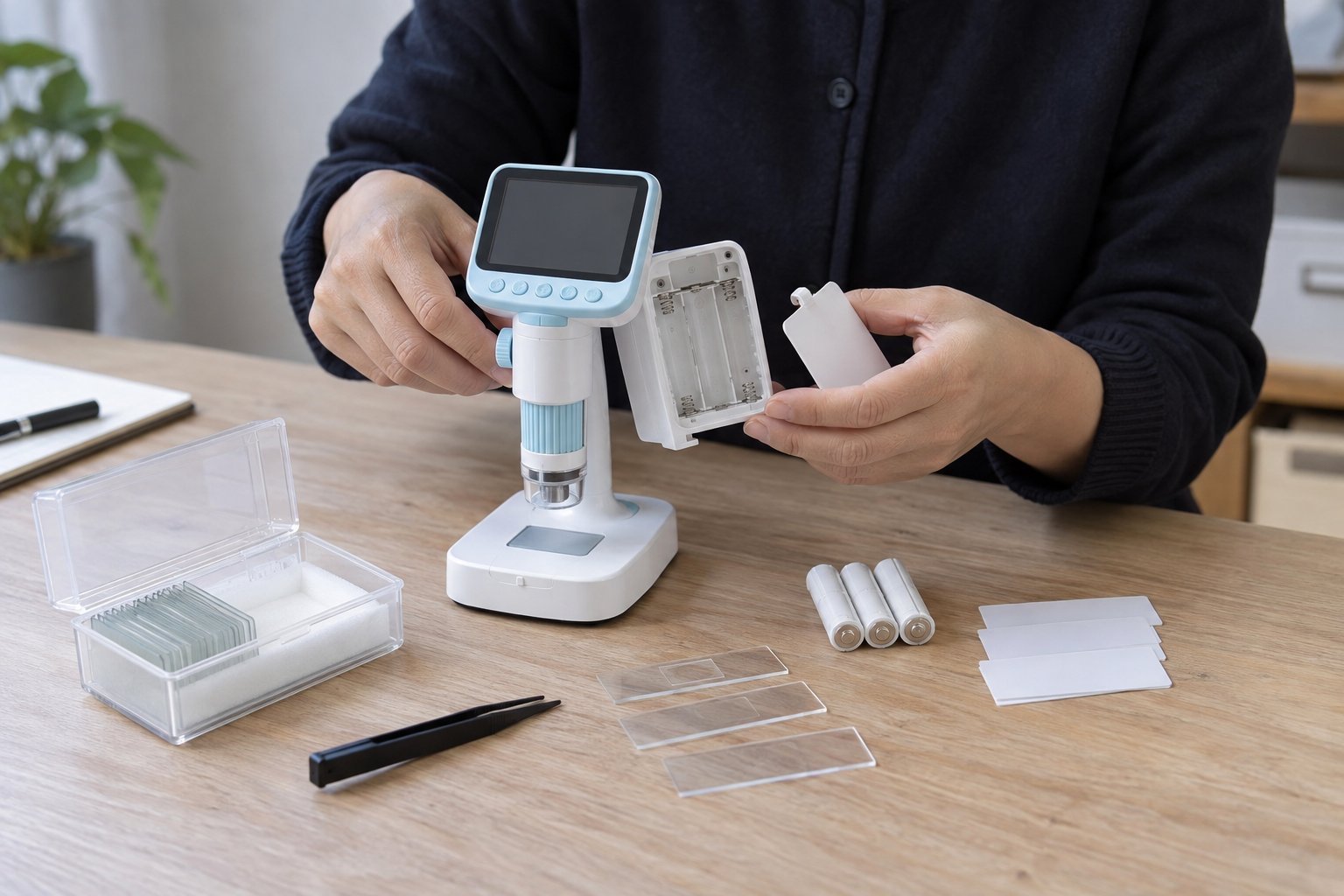
Charging logistics matter when buying a class set. Count sockets, chargers and safe storage spaces. Record expected session length under the chosen settings, but do not publish a runtime claim without a defined measurement method. If the product uses replaceable batteries, specify the type, compartment security and whether cells are included in each sales market. Plan end-of-term checks for cables and battery condition.
Align Packaging and Shipment Inspection
Make a pack-out list visible to the inspection team: microscope, stand, tray, cards, sample tools, cable, case and manual, as applicable. Compare the list with the approved sample and the retailer product page. Inspectors can count parts, check visible damage and run a defined power-on/focus check. They cannot validate a semester-long educational outcome from a short shipment inspection.
For multi-school deliveries, label outer cartons by kit version and language. A mixed shipment with two apps or accessory revisions can cause avoidable support work. Include a teacher quick-start sheet and a spare-parts contact path. If the buyer asks for branded lesson materials, approve the final proof before bulk printing and include it in the inspection reference package.
Design a Small School Pilot Before Bulk Purchase
A school buyer can test a class set without claiming a formal educational outcome. Start with a single lesson objective and two or three specimen types. Invite one teacher to run the activity using only the supplied guide, while another adult observes setup time, student handover and cleanup. Record where instructions are misunderstood. The point is to discover operational friction, not to publish a score for “learning improvement.”
Choose a specimen that works reliably under typical classroom lighting. A leaf may be visually attractive but can vary with thickness and moisture; a printed textile sample or prepared slide may be more repeatable for comparison. If learners work in groups, check whether the image can be shared by turning the screen or connecting an approved display. Do not assume wireless screen sharing or video recording is available unless the model provides it.
Budget time for charging and storage. A portable microscope used by many groups may need several power cycles within a school day. Ask who checks battery level, who stores the cable and how cases are labeled. If a unit fails during a lesson, the teacher needs a fallback activity; that need may justify one spare unit for the pilot, even when the final purchasing ratio is lower.
A pilot observation sheet
| Phase | Record | Why it matters |
|---|---|---|
| Unbox | Missing parts, label clarity, first charge | Readiness before class |
| Focus | Time to find useful detail on reference objects | Practical optics and handling |
| Share | Whether several learners can see the result | Group usability |
| Clean | Surfaces and tools needing attention | Safe repeat use |
| Repack | Lost parts, battery state, case fit | Next-day readiness |
The sheet should be tied to the exact SKU and firmware or app version. A teacher's comments can guide revisions, but do not write “tested by schools” unless an actual documented school pilot occurred and participants agreed to that use of their feedback.
Keep Digital Records Appropriate for Children
If the product can save photos, explain what it records and where files go. Specimen images need not include students' faces or names. Recommend a fictional sample ID for demonstrations and ask whether the app requests an account. A school may have its own data-handling rules and may prefer a device that works offline. Procurement should confirm the actual app and region before committing to a class set.
For home retail, the privacy question is simpler but still real: can a parent delete images, reset the device and remove a pairing before giving it away? State these steps in a support article where applicable. An optional capture feature can be presented as such; it should not become an implied cloud archive in the listing.
The same clarity applies to educational claims. A microscope encourages observation and questions, but an instrument alone does not guarantee a science curriculum. Supply sample activities that describe what to look for and how to compare objects. Keep the outcome modest and observable.
Make the Retail Listing Verifiable
Do not use a highly magnified stock specimen image without explaining whether it was captured by the actual product. A buyer should request sample photos made with the production-intent device and the supplied lighting. Identify specimen, camera settings and any post-processing. This provides a credible illustration while preserving realistic expectations. A display mockup with an impossible level of detail can create disappointment even if the hardware performs as designed.
The product description should distinguish optical magnification, digital enlargement and screen size. If the quoted version has several display modes, describe them separately. Ask whether image storage requires an SD card, phone or computer that is not included. Add a simple component photograph so teachers can prepare supplies before a lesson. Make sure the carrying case shown is actually in the SKU.
For customer support, maintain a reference set of troubleshooting photos: out-of-focus image, dirty lens, poorly lit sample and correct setup. A teacher can then identify a setup issue without sending a student photo to the supplier. This is a small operational investment that can save replacement shipments and protects the product's reputation with school buyers.
Write a Procurement Brief a Teacher Can Approve
The final brief should name the learner age range, lesson objective, specimen types, number of shared viewers, device power source, available classroom screen and cleaning method. Include a photograph of the exact production-intent kit with all parts laid out. This lets a teacher see whether the proposed purchase supports a real lesson rather than a generic “science fun” promise. It also gives the supplier a controlled reference for packing and inspection.
Ask the school which accessories it may already own. A tablet stand or display cable should not be bundled automatically if school IT will not allow it; conversely, a microscope that requires an unsupported phone app may be unusable despite an attractive unit price. Clarify network and account restrictions before samples are approved. The buyer can then choose between standalone and connected configurations based on actual deployment needs.
For replenishment, keep part numbers for slides, trays and cases. A teacher should be able to request one missing tray before the next term without replacing an entire optical unit. This is a better signal of classroom readiness than a large magnification number.
Frequently Asked Questions
How many microscope kits does a classroom need?
That depends on group size, observation time and supervision. Model the lesson rotation with one sample kit before deciding a unit-per-student ratio.
Does higher digital magnification guarantee a better view?
No. Lighting, focus, sensor detail, display and specimen preparation affect what students can actually observe. Ask to compare the same reference objects under the same conditions.
Can children collect their own specimens?
Only within a teacher-approved, age-appropriate procedure. Avoid sharp, hazardous or unknown materials and document how tools and slides are handled and collected.
What consumables should a buyer budget for?
Consider slide materials, specimen cards, cleaning cloths and replacements for easily lost parts. Confirm which are supplied with the quoted SKU rather than assuming the demonstration kit matches retail pack-out.
Is a smartphone app necessary?
It depends on the actual model. Identify whether viewing, capture or saving requires a separate device or account, and confirm school IT compatibility before purchasing class sets.
Conclusion
A classroom-ready microscope program starts with an achievable lesson and works backward to optical clarity, safe handling, cleaning and kit replenishment. Ask a teacher to walk through the entire session with the production-intent sample. That is more revealing than a magnification badge on the box.
Final CTA
For related sourcing questions, browse all buyer guides or the Product Sourcing collection.
Explore the current KudBo product catalog when comparing this guide with available SKUs.
Get a Quote for your target age range, kit count and accessory specification, or email info@kudbo.com. KudBo can help define what belongs in the sample and shipment inspection brief.