Introduction
A document scanner mat can align a page, but readable capture depends on light, focus and the source material. If a glossy note reflects a lamp or a handwritten margin falls outside the capture zone, a high-resolution camera will not automatically fix the result. Buyers should approve the complete page-to-file workflow before claiming that a desk accessory “digitizes notes perfectly.”
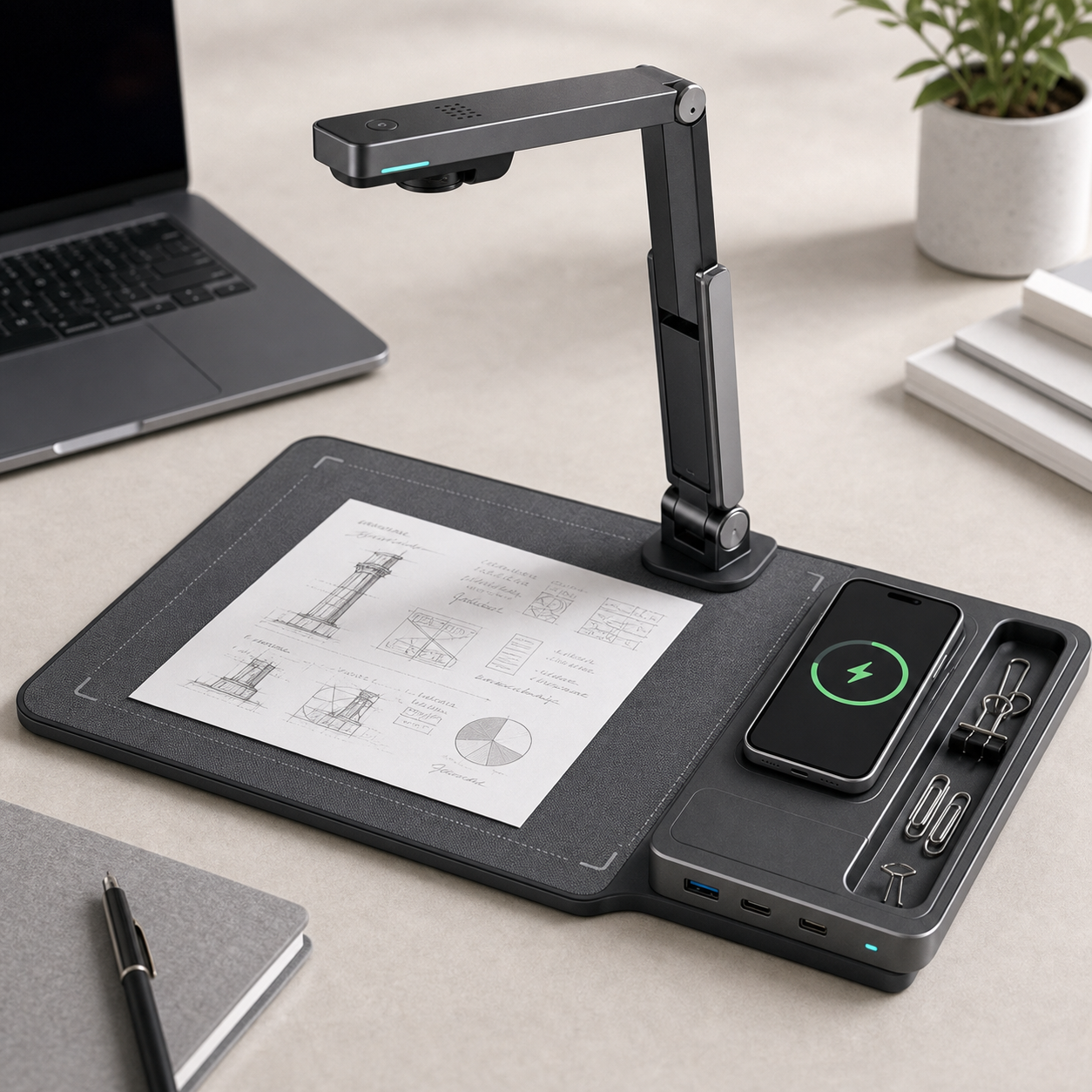
The KudBo desk note scanner mat can serve hybrid work, study and gift channels. An earlier guide covers privacy and workflow. This article concentrates on optical setup and the boundary between a captured image and machine-readable text. It does not assert a measured OCR accuracy or imply that every model contains its own camera, app or cloud service.
The question is practical: what does a customer place on the mat, what device captures it, what lighting is available and what file do they receive? Those four details should be explicit in the quote and product page. A neat desktop hero shot often hides the holder, phone and software that made the demonstration possible.
Define the Supported Capture System
List every piece required: mat, alignment marks, phone stand, camera, light, app, power cable and export service. Mark included, optional and customer-supplied parts. A mat sold without a camera may still be useful as a consistent capture surface, but it should not be marketed as a standalone scanner. Identify supported phone sizes and operating systems if an app is part of the proposition.
Measure the document area the customer can actually use. An A4 sheet, small receipt, notebook page and folded bill behave differently. Check whether boundaries remain visible when a white paper sits on a light mat. If a page must be flattened, provide a safe method that does not damage delicate material. Do not imply suitability for fragile archival documents without specialist assessment.
The Library of Congress guidance on digitization notes that image requirements depend on the material and intended use. It does not certify a retail scanning mat. A buyer should borrow the principle of choosing adequate capture for the task, not an arbitrary dots-per-inch figure from an unrelated system.
Test Light and Glare Before Software
Use a fictional sample set: plain printed text, handwriting, glossy receipt, colored sticky note and a low-contrast pencil page. Capture each under a window-side daylight condition and a common overhead lamp condition. Keep camera position, page angle and exposure settings recorded. If light changes the outcome, that is a product-instruction issue, not simply a software defect.
Watch for bright reflections, shadows from the holder, curled page corners and uneven light across a larger sheet. The National Archives digitization guidance discusses even lighting and faithful rendering in a preservation context. A desk product has different performance goals, but the same optical problem can make a document harder to read. A buyer should not promise preservation-grade capture from an ordinary retail accessory.
If the mat includes a built-in light, ask for its power and control method and check the camera view for flicker or glare. If lighting is customer-supplied, do not photograph an elaborate studio setup as though it were part of the box. A simple printed recommendation for lamp placement can prevent many avoidable complaints.
Separate Image Quality from OCR Accuracy
An image may be legible to a human but difficult for OCR on cursive, unusual fonts or textured paper. Define the target: storing a visual note, extracting searchable text or converting a handwritten page to editable prose. Those are different claims. Do not add “AI recognition” to a listing merely because an app can crop the photograph.
Build an acceptance set of fictional pages that reflect the target customers. Compare the captured image first: are edges present, letters in focus and colors sufficient? Then evaluate OCR only if the quoted software actually provides it. Record errors by type: dropped lines, mistaken characters, wrong reading order and unsupported handwriting. A single percentage without a defined reference transcription is meaningless.
If text extraction is imperfect, the app should preserve the original image and make correction possible. A buyer may find that a mat improves repeatability even when OCR remains limited. That is a legitimate benefit to describe. It is more trustworthy than a blanket “turns handwriting into perfect digital text” promise.
Review Privacy with Fictional Documents
Notes can contain confidential information. Use invented names and numbers in sample trials, never actual invoices, identity documents or employee notes. Ask where images are processed, whether an account is required, how files are stored and shared and what happens after deletion. Review the app's current documentation for the exact model and sales market.
The FTC guidance for app developers emphasizes security for apps handling personal information. It does not validate a particular scanner app. A retailer should keep privacy claims aligned with the real data path and provide a reset or account-transfer procedure where relevant. A mat with no app has a different data boundary from a cloud-assisted capture bundle.
For an office buyer, identify whether the device can work offline, export to a controlled folder and avoid automatic upload. If the answer is unknown, mark it unresolved rather than assuming an “on-device” workflow. Procurement and IT teams should approve the actual service before using the product with real business records.
Mid-Article CTA
Send Your Requirements with document types, capture device, OCR expectations, privacy constraints and quantity. Email info@kudbo.com for a model-specific component and software review. Include whether your program is consumer retail or an office deployment.
Make First Use Reproducible
The quick-start card should show paper placement, camera height or holder position, light direction, image review and export. Test that card with someone not involved in the demonstration. If they must guess which app to install, where to put the phone or why a glare stripe appears, revise the handover before printing boxes.
For repeat use, provide a way to keep the mat clean without harming alignment marks or electronics. Ask whether the surface can be wiped and with what agent. A worn or reflective surface may affect capture consistency over time. If the mat folds, inspect whether a crease crosses the capture area when reopened.
Record the complete pack-out and photographs of the approved setup. An inspection team can verify mat dimensions, print quality, included holder, cable and instructions. It cannot establish OCR accuracy from a single power-on or photo test. Keep software version, reference pages and acceptance method in a separate evidence file.
Compare Cost of the Whole Workflow
Price the mat plus any required holder, light, app subscription, service account and support. A low-cost mat may be attractive if buyers already have phones and need a positioning aid. A bundled system may offer a simpler first use but carry more service obligations. Neither is better without the target user and data needs.
Check support ownership for app compatibility after operating-system updates. A printed QR code should lead to a maintained destination. If the software provider changes, the buyer must decide who updates customer instructions and responds to users. A durable desk accessory can outlive a short-lived app promise; plan for that gap.
| Buyer requirement | Sample evidence | Claim boundary |
|---|---|---|
| Page alignment | Defined sheets on mat | Not all document sizes |
| Readable capture | Photos under stated light | Not a universal image-quality grade |
| OCR | Fictional reference set and error log | Not perfect recognition |
| Privacy | Actual data-flow documents | Not assumed offline or local |
Create an Acceptance Set Buyers Can Reuse
A reusable acceptance set makes future supplier changes visible. Prepare fictional pages in each format that matters to the buyer: printed memo, notebook handwriting, receipt, diagram and colored annotation. Store the originals and an expected human transcription where OCR is part of the specification. Capture them at a marked camera height and under documented light conditions. Score image completeness separately from text extraction so a cropping problem does not get misdiagnosed as an OCR problem.
For a retail listing, show the actual supported workflow. If the user needs a phone with a specific app, make that visible. If the mat is simply a stable background, describe the benefit as alignment and repeatability rather than suggesting that it processes documents by itself. A short demonstration can show setup and export without displaying personal data. Avoid using a genuine invoice or employee note for a convenient marketing shot.
When a supplier changes the mat print, surface finish or recommended app, repeat the acceptance set. A glossier surface can create glare; a new alignment border can clip small pages. Keep the old and new results with version numbers. That is a practical way to protect an office-accessory program from quiet quality drift without inventing a universal OCR percentage.
Separate Retail and Office Use Cases
A student may want a quick image of handwritten notes; an office team may need a searchable archive with controlled storage. The same mat can be appropriate for one and inadequate for the other. Write a use-case table before quoting the software: document size, capture device, image destination, required text extraction and permitted sharing. This prevents a low-cost desktop accessory from being sold as a document-management system.
Ask whether the capture position can be restored after the desk is cleared. A printed corner guide, fold line or phone stand can improve repeatability, but only if it remains aligned in daily use. Verify that the mat material lies flat after packing and does not reflect overhead light. The most credible sample demonstration uses the buyer's ordinary office lamp and phone, not a hidden studio rig.
If the product is offered to a corporate buyer, include a deployment handover: approved app version, support contact, sample export, reset procedure and privacy note. If no app is provided, say so. The product can still be a useful capture surface without being described as a digital service.
Identify What a Shipment Inspector Can Actually Check
Inspection can verify mat dimensions, printed alignment marks, surface finish, included stand, cable and quick-start card. It can also run a defined capture with a fictional reference sheet when the camera or app is part of the SKU. That check should record phone model and software version. It should not be described as a general proof of OCR quality for all handwriting and documents.
If a support ticket concerns poor scans, first separate an optical problem from a software one. Ask for the document type, light source, camera height and whether the original image is legible. Only then look at OCR extraction. A retailer can prepare troubleshooting examples using fictional pages and consistent lighting. This avoids asking customers to email confidential records merely to explain a setup problem.
For a private-label buyer, align packaging photos with the final configuration. If the mat is sold without a phone holder, a hero photo showing one should mark it as a prop. The same principle applies to app screens and exported files. A precise listing reduces returns and helps search visitors understand the product in one glance.
Frequently Asked Questions
Does a scanner mat include a camera?
Not necessarily. A mat may only provide positioning and background contrast. Confirm whether a phone, stand, light, app or subscription is included in the exact quoted configuration. Retail images should not imply bundled parts that are customer supplied.
Will a higher-resolution camera always improve OCR?
No. Focus, glare, page flatness, contrast, software and source handwriting also matter. Test the actual capture system with representative pages before making a recognition claim. Preserve the original image so users can correct extracted text.
Can buyers test with real customer documents?
Use fictional data for early sample review. Real documents introduce privacy, permission and retention questions that should be settled before use. An office deployment may require IT and legal review of the actual app and service.
Is a legible picture the same as searchable text?
No. A photograph can be readable to a person without OCR or indexing. Describe separately whether the product captures images, extracts text and exports searchable files. Each function may depend on different supplied or optional components.
What should shipment inspection check?
Inspect the mat, printed alignment marks, included holder or cables, label and instructions against a dated reference. A routine check can confirm physical pack-out and selected functions; it does not prove OCR performance across all documents.
Conclusion
Approve a desk scanner mat as a complete capture workflow. Control light and page alignment first, test text extraction separately and disclose any software or data dependency. A realistic sample set and a short first-use card make the product easier to explain and support.
Final CTA
For related sourcing questions, browse all buyer guides or the Product Sourcing collection.
Explore the current KudBo product catalog when comparing this guide with available SKUs.
Contact KudBo or email info@kudbo.com with market, quantity and capture requirements. KudBo can help coordinate a model-specific sample and a claim/evidence checklist for your retail or office program.