Introduction
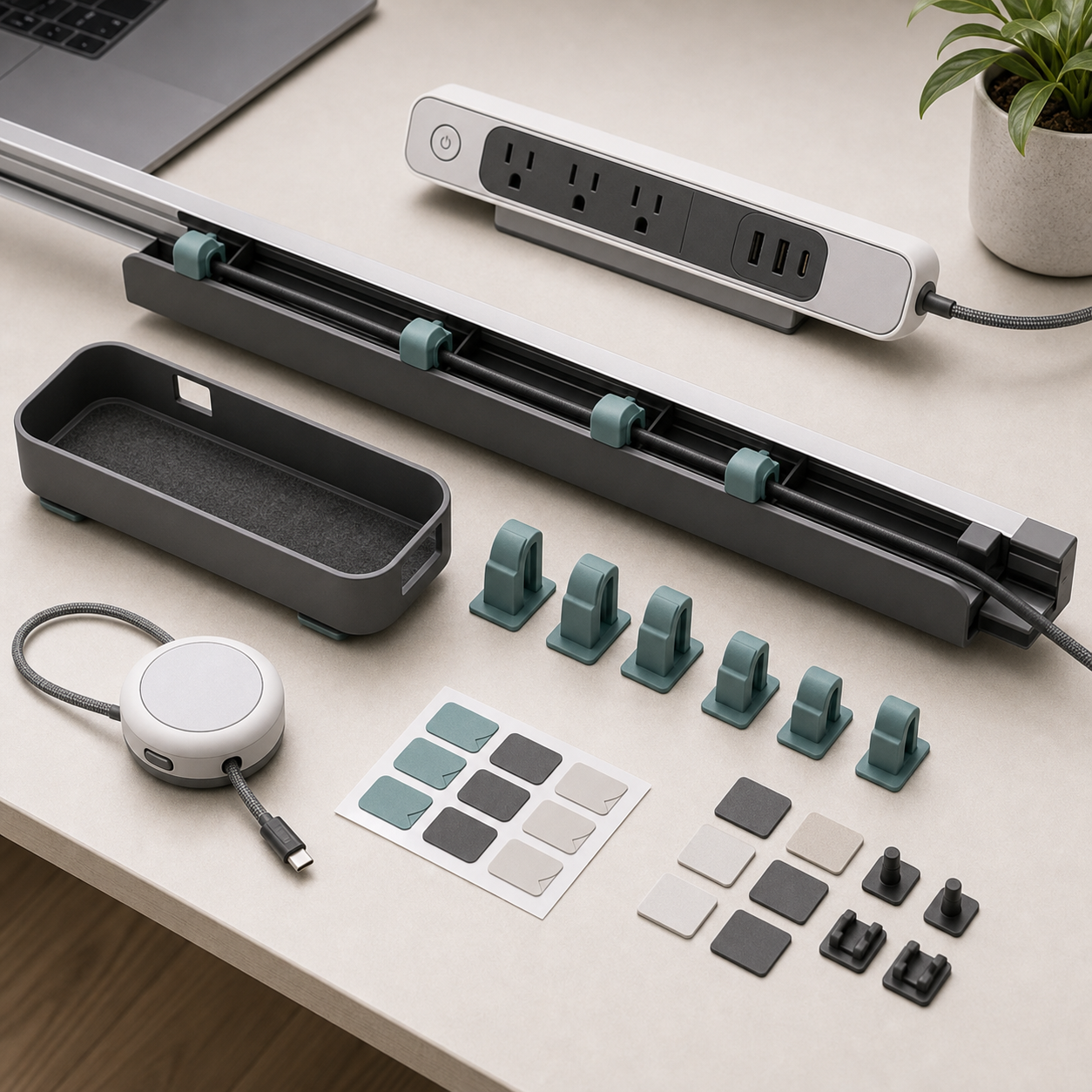
Adhesive and screw mounting solve different installation problems. Adhesive can avoid drilling in a rental office but depends on the desk surface and preparation. Screws may offer a more inspectable attachment but can damage thin panels or breach a desk's finish. Neither choice is automatically stronger in every situation. For the KudBo desk cable raceway kit, a wholesale buyer should define the intended desk, cable load and removal expectation before ordering mounting materials.
An earlier cable raceway buyer guide covers the general kit. This article isolates a practical question raised by office purchasers: what holds the channel under the desk today, and what happens when the workstation changes next year? The suggested checks below are procurement methods, not a statement that KudBo has performed a particular load test on a model.
Start with the Desk Surface
Ask where the channel will attach: laminated particleboard, painted metal, solid wood, powder-coated frame or an under-desk cable shelf. The underside may be rougher or dustier than the visible top. An adhesive result measured on clean glass does not answer whether a strip will hold on textured laminate. If screws are proposed, the buyer needs minimum panel thickness, edge clearance and a drilling template from the desk manufacturer or installer.
Take a sample of the actual furniture finish into the review if a large office rollout is planned. Clean it as the adhesive maker specifies, apply the sample, allow the stated dwell time and load it in the orientation that will occur under the desk. Record temperature and humidity where they matter to the adhesive instructions. Do not invent a universal waiting period or strip count. For screw mounting, use the specified fastener length and check that no tip emerges through the visible surface.
The installation decision also includes the owner's authority. A facilities team may prohibit drilling leased furniture. A homeowner may prefer a removable clip. A retailer selling into both channels can offer a clearly labeled choice, but should not imply that adhesive and screw kits are identical if they need different rails or hole positions.
Estimate the Cable Load Honestly
List the cables and adapters the user is expected to place in the channel. A few thin signal cables behave differently from a heavy power brick and thick mains leads. Weigh a representative bundle and note where it pulls on the raceway, especially at an open end. A channel can stay attached under a static load yet detach when a user tugs one cable or raises an adjustable desk. The acceptance method should include that foreseeable movement.
Keep electrical safety separate from mechanical tidiness. A plastic channel does not increase the electrical rating of an extension cord or power strip. The CPSC extension-cord safety guide is a reminder that cord capacity and condition still matter. A raceway seller should not advertise that hiding a cable makes an overloaded circuit safe. If the kit includes a powered component, that component needs its own review.
For adjustable desks, move the desktop through its full travel with the intended cable slack. Check whether the channel passes a frame, support arm or wall. A buyer can use a short routing diagram showing where cables may enter and exit; that is more useful than a photograph where all cords disappear behind the desk.
Compare Installation and Removal
Time a first-use installation only when the desk and tools are specified. Ask a new operator to unpack the kit, identify the intended orientation, attach sections and load a reference cable bundle from the instructions. Note whether the adhesive backing tears, whether screw holes line up, and whether corner pieces can be installed without forcing cables to bend tightly. These observations identify instruction problems before a retailer ships thousands of packs.
Removal is a different test. If “damage-free” is a planned claim, define the finish, attachment age and removal method, then inspect for residue, lifted laminate and screw holes. A screw-installed channel is not damage-free simply because it can be unscrewed. Adhesive may remove cleanly from one finish and pull paint from another. State the limitation rather than applying a blanket promise to every desk.
The OSHA workstation-component guidance emphasizes arranging accessories and components to support comfortable work. It does not certify a particular raceway. Use that principle when checking whether the installed channel crowds knees, blocks a chair or makes the user crawl under the desk to disconnect a device.

Mid-Article CTA
Send Your Requirements with your desk materials, cable bundle, installation permissions and expected quantities. Email info@kudbo.com for a model-specific mounting and pack-out checklist.
Define Maintenance and Change Control
Office cable layouts change. Ask whether the channel opens without removal, whether cables can be added after installation and whether clips survive repeated opening. A raceway that must be detached every time a laptop dock changes may be unsuitable for a dynamic workstation even if its first installation is tidy. Quote replacement lids, clips and mounting materials if the system is modular.
If the supplier changes an adhesive brand or fastener, require notice and a new surface check. Two white foam strips can look the same while having different load behavior or removal instructions. Put material part numbers on the approved bill of materials. Keep photos of the exact packed adhesive and screws so shipment inspection can identify a substitution.
A retail pack should label the two mounting modes clearly. A customer should not place screws through adhesive-only plastic ribs or attach an adhesive rail to an oily surface because the options were mixed in one leaflet. Separate the relevant steps with icons or headings and include a warning to check the furniture maker's guidance before drilling. Do not rely on a QR video as the only source of essential instructions.
Build a Quote Comparison Table
| Question | Adhesive option | Screw option |
|---|---|---|
| Best-fit surface | Smooth, approved and clean finish | Suitable drillable panel or frame |
| Main uncertainty | Bond and removal on real finish | Panel thickness and hole location |
| Movement check | Bond under cable tug and desk travel | Fastener stability under same travel |
| After relocation | May need new strips | Leaves holes unless reused |
| Pack-out | Correct strips and surface instructions | Correct screws, template and tool guidance |
The table is a decision aid, not a performance rating. A buyer can add a third clamp-mounted option if the supplier offers it, but must review clamp clearance and desk edge geometry separately. Avoid comparing quoted unit prices without the fasteners, installation time and potential replacement materials.
At shipment inspection, check section length, mounting slots, lid fit, adhesive or screw count, instructions and carton protection. A visual pack-out check cannot establish long-term holding strength; preserve the sample-test evidence and recheck after material changes. Return data can then distinguish a missing strip from a surface-compatibility problem.
Quote the Total Installation, Not Only the Rail
Two bids for the same desk count may differ because one includes surface cleaning, clips, spare adhesive, screws and under-desk photographs while the other prices only the raceway. Ask both suppliers to identify exactly what arrives in the carton and what tools or consumables an installer must provide. If a site has rented desks, removal and finish restoration deserve an explicit line item. If cable layouts change often, the cost of reopening a system matters more than a small saving on the initial strip.
Calculate a modest pilot before office-wide installation. Include one fixed desk, one sit-stand desk and one difficult surface. After installation, add a cable and remove one; run the desk through its full travel and inspect the floor area for loops. Record each adjustment and the time it takes. A buyer can then decide whether adhesive, screws or a mixed approach is appropriate by desk type. No single mounting method is universally superior.
The final specification should state permitted surfaces, load, cleaning or cure steps, screw restrictions, cable-change access and an approved removal method. At shipment inspection, count all mounting hardware and compare material dimensions to the reference sample. A raceway that is a few millimeters narrower may no longer accept the planned cable bundle. The right comparison is system suitability across the actual office, not appearance on an empty desk.
Create an Installer Handover Sheet
Office buyers often compare installation by unit cost while ignoring removal and cable changes. An installer handover sheet should identify desk surface, chosen mounting method, mounting position, cable bundle and any area reserved for a sit-stand desk's travel. It should show the underside of the actual desk, not a generic picture. Record which cables must remain reachable for service and which power adapters need ventilation. If a raceway is supplied in modular segments, note the approved segment spacing and how the corners are supported.
For adhesive mounting, specify surface preparation, cure time and the consequence of removing the product. If a finish is sensitive or leased furniture must be restored, perform a patch test on an inconspicuous location. Do not claim residue-free removal without material-specific evidence. For screw mounting, verify panel thickness and hidden equipment before drilling. A screw length that is harmless in a thick solid top may damage a thin laminate panel or emerge through the work surface.
The handover should also anticipate change. Add one cable after the initial install and remove another. Can a technician open the raceway without detaching it? Does the clip survive reopening? Is there a place to keep excess cable without crushing connectors? A product designed only for first installation can be costly in an office where equipment is replaced frequently. Review the instructions with someone who did not participate in the sample demonstration.
At handover, photograph the loaded raceway in the desk's highest and lowest positions. A cable may look slack while the desk is down and become taut when raised. Mark any point where a lead contacts a moving arm or sharp metal edge. If a power strip is present, its own mounting and ventilation need review; a raceway should not become an excuse to bury unsafe electrical connections. State clearly which items are supplied by the cable-management kit and which belong to the customer's workstation.
Frequently Asked Questions
Is an adhesive desk raceway always removable without damage?
No. Removal depends on the surface finish, adhesive, dwell time and method. Ask for a defined test on the actual desk material before using a damage-free claim.
Can a raceway hold a power brick?
Only if the exact channel and mount have been reviewed for that load and orientation. Do not infer capacity from the channel's appearance or from a photograph.
Does cable organization make an extension cord safer?
Organization may reduce clutter, but it does not change a cord's electrical rating. Review load, condition and routing separately from the raceway.
Which method suits a height-adjustable desk?
Either may work when the mounting surface and movement path are suitable. Move the desk through its full range with a realistic cable bundle during sample approval.
What should be in a wholesale raceway kit?
Confirm the exact sections, corners, lids, clips, mounting materials and installation guide. Do not assume the demonstration hardware is in the retail box.
Conclusion
The right mounting method is the one supported by the customer's desk, cable load and future changes. Approve an installation and removal sequence on the intended furniture surface, keep electrical questions separate and lock the mounting materials in the bill of materials.
Final CTA
Get a Quote for your target desk and mounting variant, or send the brief to info@kudbo.com. Browse the current product catalog, all buyer guides and the Product Sourcing collection while comparing workstation options.